
A-115For School Admins and Directors
Queue for Claude ($0): cheat sheets, mind maps, visual guides and pictures at no charge
Every paid estimate panel on a course page (Add cheat sheets, Add mind maps, Add mind map videos, Add visual guides to lessons, Add pictures to lessons) has a second choice for the VocationalLMS Super Admin: Queue for Claude ($0). A School Admin keeps the paid Start and, when the platform allows it, sees a note to ask the platform owner.
How-to video A-115 · 0:41
Read the words of this video
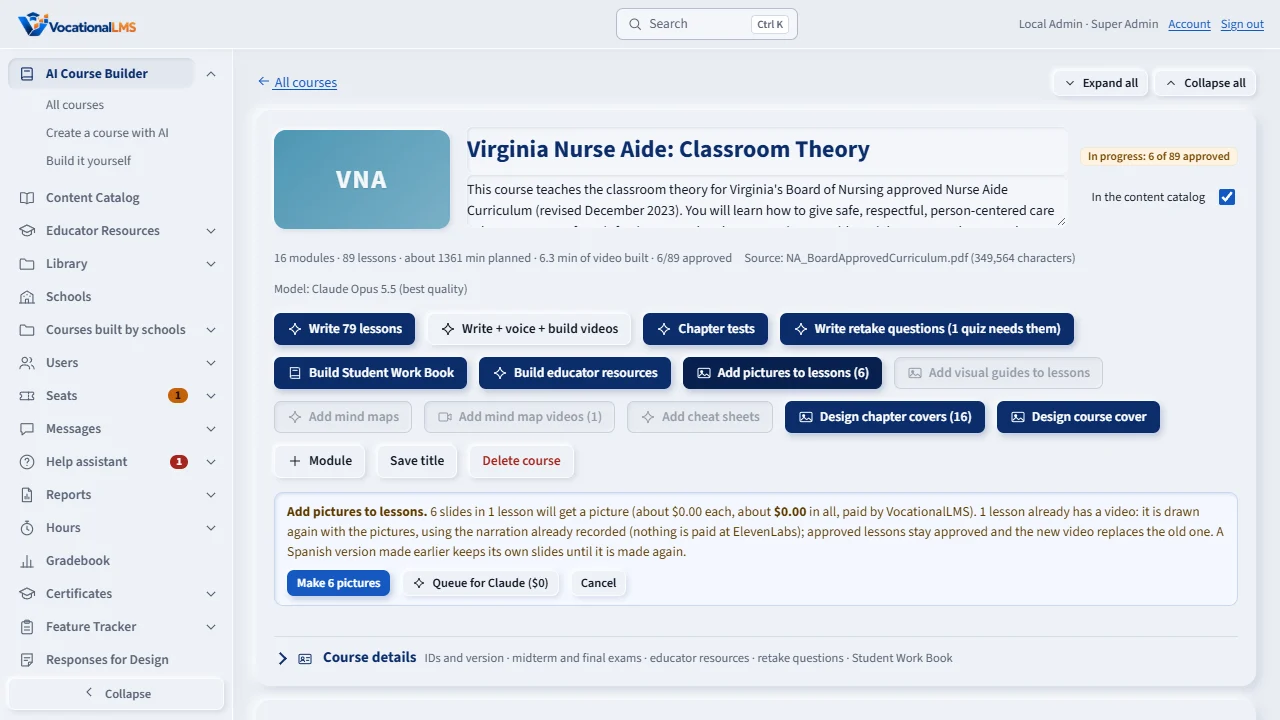
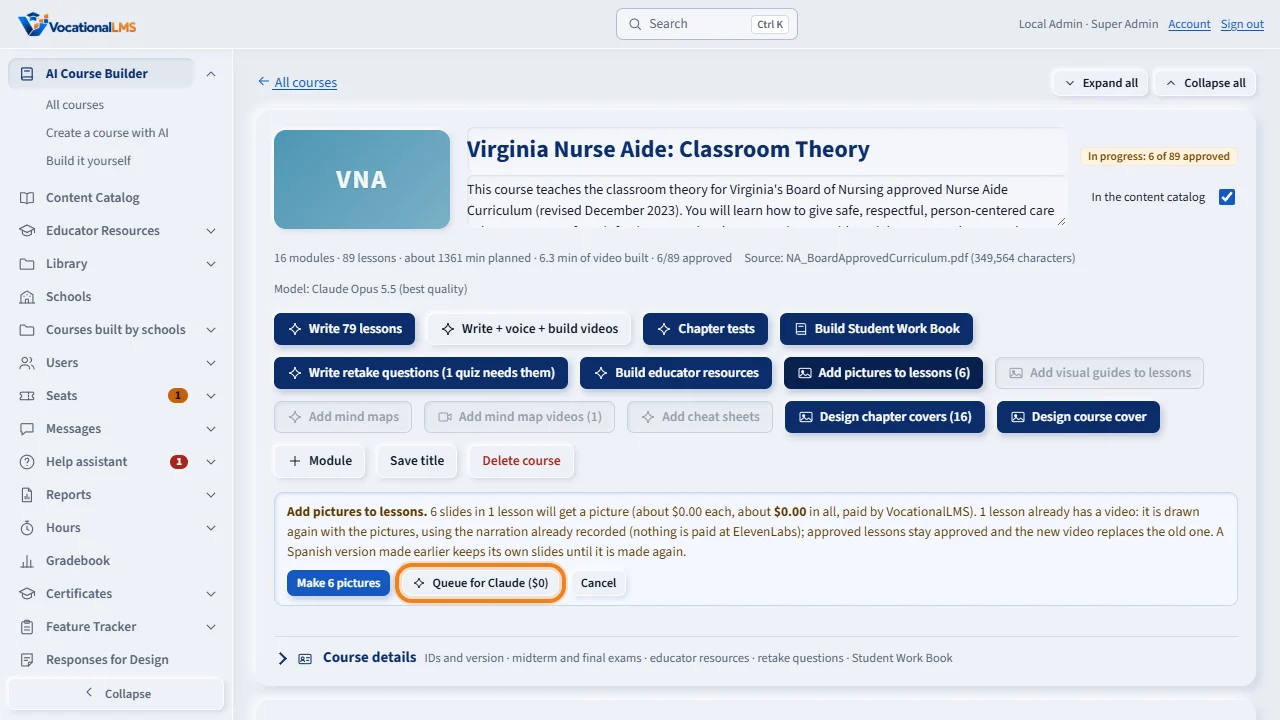
The paid buttons on a course page open a yellow estimate panel with the number of lessons and the cost. Right next to Start is Queue for Claude, zero dollars.
It writes the request down instead of paying the AI service, with the exact lessons the paid job would have done. A chip shows Queued for Claude.
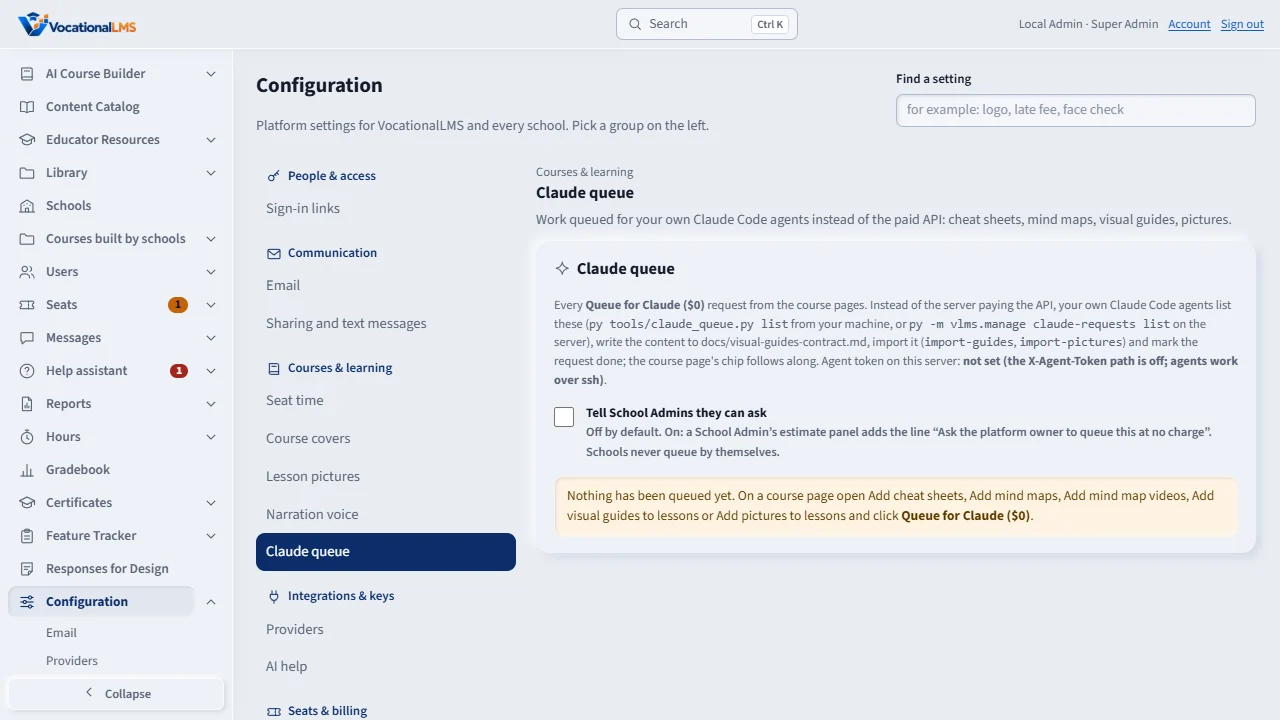
Configuration, Claude queue lists every request with its status and the dollars saved. Your own Claude Code agents write the content and import it, and it appears for students at once.
Open this in VocationalLMSAI Course Builder > a course > Add cheat sheets > Queue for Claude ($0)
Who can do this: Only the VocationalLMS Super Admin sees Queue for Claude and the chips. A School Admin or Director sees the paid Start as before and, only while the platform owner turned on Tell School Admins they can ask (Configuration > Claude queue, V-67), the line Ask the platform owner to queue this at no charge under it.
What it is for
The paid buttons on a course page open a yellow estimate panel: Add cheat sheets. 41 lessons, about $9.14 in all, a Cap box, Start and Cancel. Start makes the server call the AI service and pay for every item. Queue for Claude ($0), right next to Start, writes the request down instead, with the exact lessons the paid job would have worked on (the same count, 41): the owner's own Claude Code agents write the content under the owner's plan, import it with the contract in docs/visual-guides-contract.md, and mark the request done. The course pays nothing. A chip next to the button follows the request: Queued for Claude · 41 lessons · Nov 11, 2:41 PM with Cancel; Claude is writing… 12 of 41; then Done by Claude · 41 added · $9.14 saved, kept for 7 days. The chip updates on its own every 30 seconds; nothing reloads. For visual guides and pictures the panel opens for the Super Admin even when no paid service is connected (the paid Start is grey then; only the queue is possible).
Steps
Queue the work (Super Admin)
- Open the course page and click Add cheat sheets (or Add mind maps, Add mind map videos, Add visual guides to lessons, Add pictures to lessons).
- In the panel click Queue for Claude ($0). The panel closes and the chip Queued for Claude appears next to the button with the count and the time.
- Change your mind: click Cancel on the chip (only while queued; nothing has been written yet). The Queue link on the chip opens Configuration > Claude queue with every request.
Follow it
- When the agents start, the chip says Claude is writing… 12 of 41 and counts up. When they finish it says Done by Claude · 41 added · $9.14 saved and the paid button's count drops, because the lessons now have what they lacked.
- If the agents could not finish, the chip says so with the note they left; queue it again when ready.
Ask (School Admin)
- If your estimate panel shows Ask the platform owner to queue this at no charge, send VocationalLMS the course name and which panel (for example Add cheat sheets); the owner queues it and the content appears in your lessons when done. Start still works as before if you would rather pay from the course's budget now.
What happens next
The content imported by Claude is the same kind the paid job makes (cheatsheet.json, mindmap.json, guide folders, slide pictures), approved and visible to students at once, with source generated-local and no cost on the course's ledger.
Common problems
| # | Problem | What to do |
|---|---|---|
| 1 | I do not see Queue for Claude. | It is for the VocationalLMS Super Admin only. A School Admin sees the paid Start (and the note, when the owner turned it on). |
| 2 | Queue for Claude is grey. | That kind is already queued for Claude on this course: the chip next to the button shows where it stands. Cancel it there if you want a fresh list. |
| 3 | The chip still says Queued after a day. | The agents have not picked it up yet. Configuration > Claude queue (V-67) lists every request; the owner's command py tools/claude_queue.py list shows the same from the owner's machine. |
See also
- V-67 Claude queue: the work your own Claude Code agents do instead of the paid API
- A-112 Cheat sheets on a lesson: write with AI, upload, edit, approve
- A-111 Mind maps on a lesson: write with AI, upload, edit, approve, build the video
- A-110 Visual guides on a lesson: import, upload, edit, preview
- A-83 Lesson pictures on the videos your school builds