
V-55For the VocationalLMS Super Admin
Resume build: continue a build that stopped, after a pre-flight check
When a build stops (ElevenLabs or fal.ai out of credits, a key problem, an update), the course says Build stopped, which provider and why; Resume build checks the providers first, then continues with only what is still unfinished. Continue anyway runs as far as the credits allow; Continue without pictures builds the videos with no slide pictures.
How-to video V-55 · 1:25
Read the words of this video
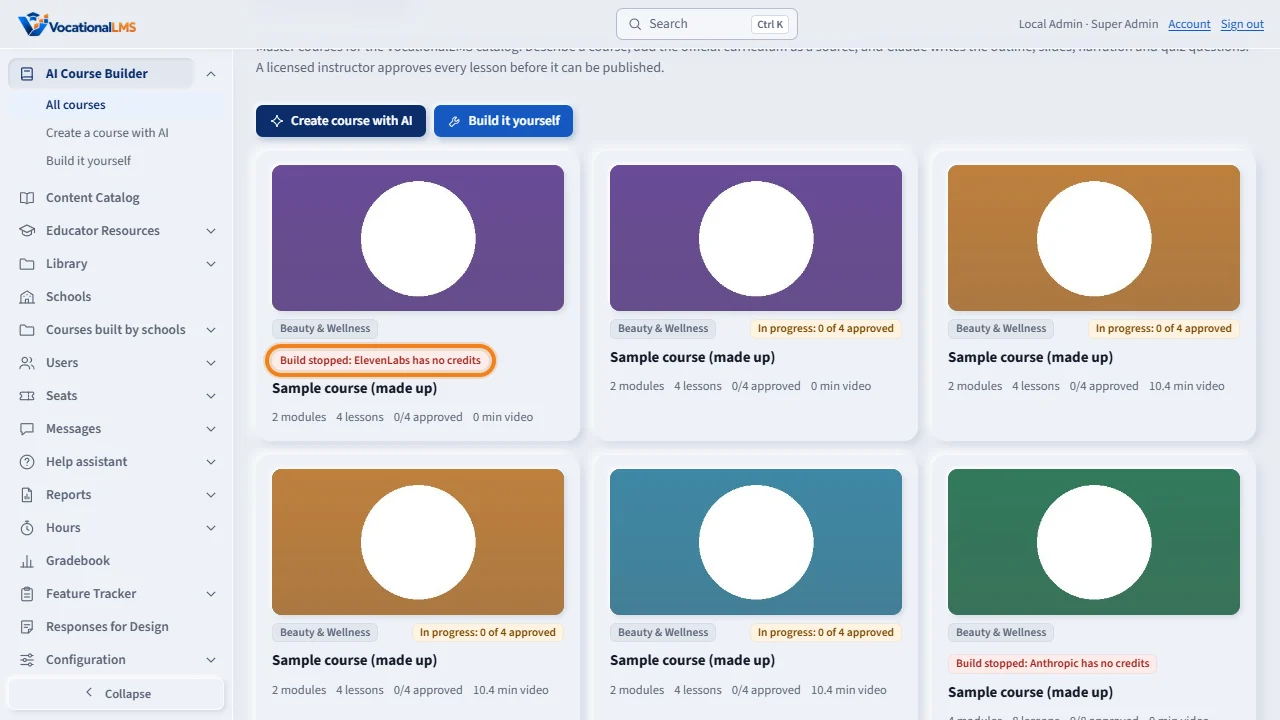
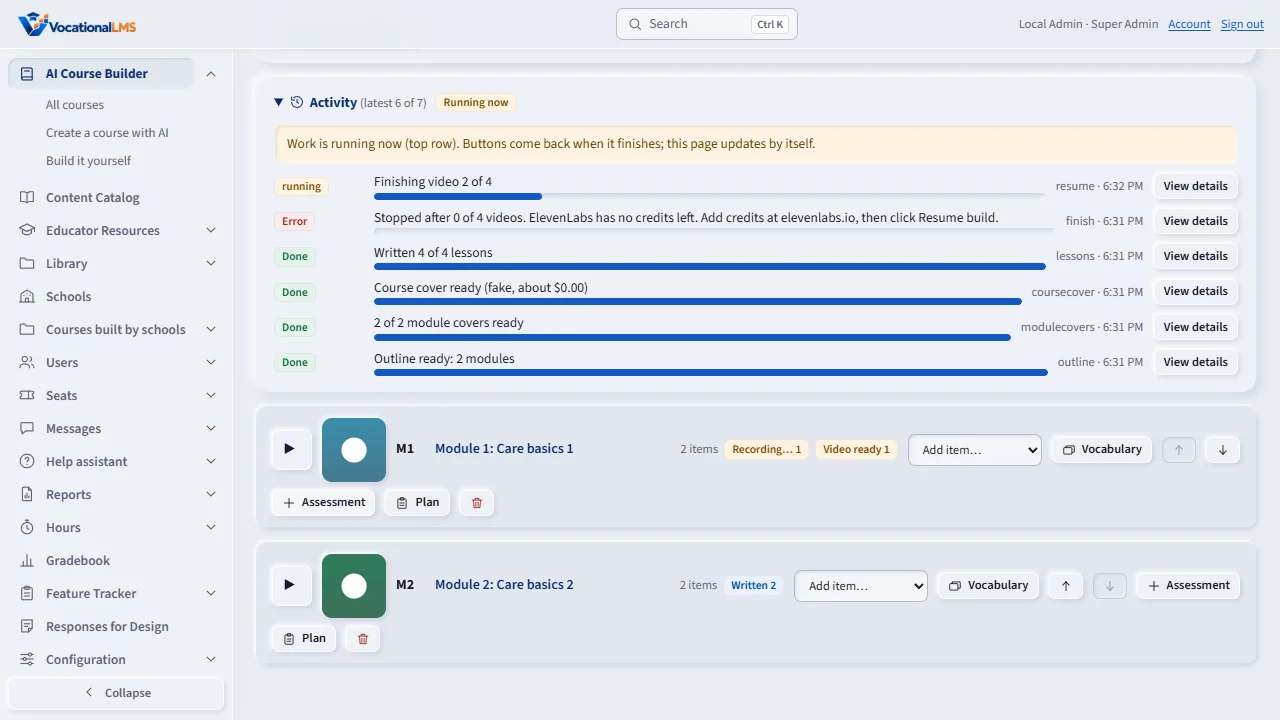
When a provider refuses for an account reason, the job stops at once instead of failing every remaining lesson. The course card says Build stopped, and why: here, ElevenLabs has no credits.
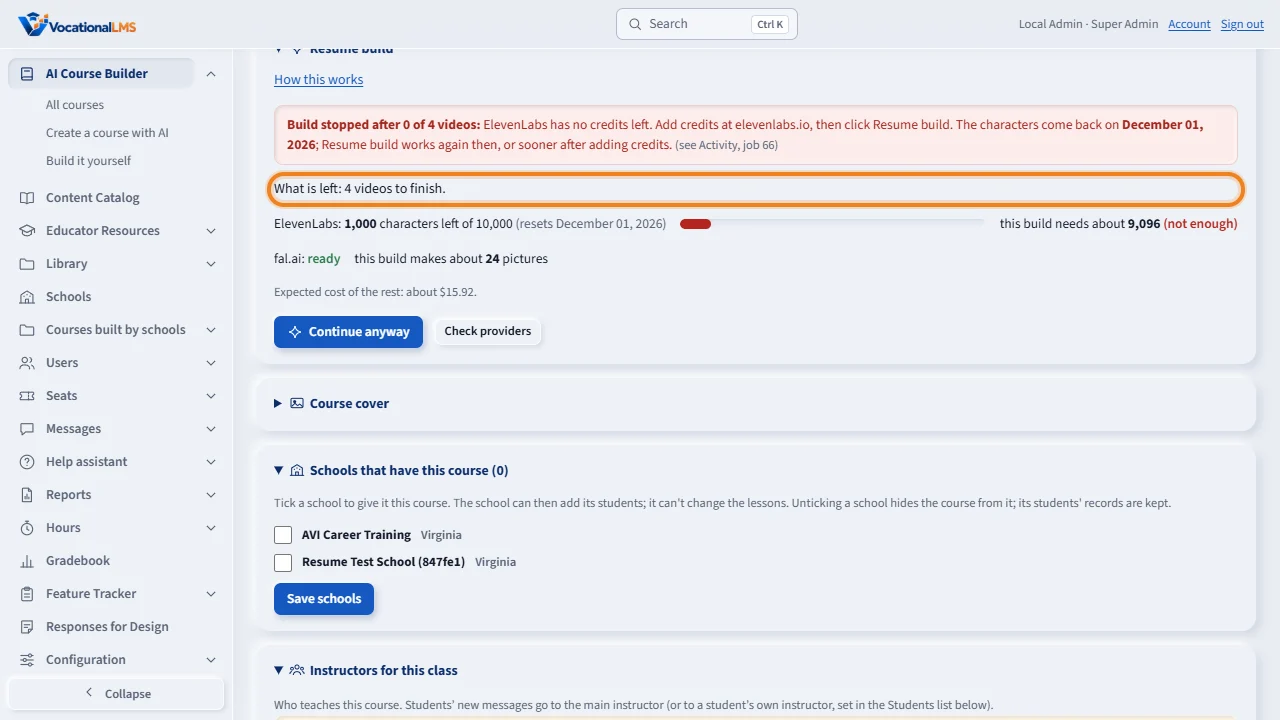
Open the course. The Resume build panel says why the build stopped and exactly what is left: lessons to write, videos to finish, readings or chapter tests missing. Nothing already done is counted.
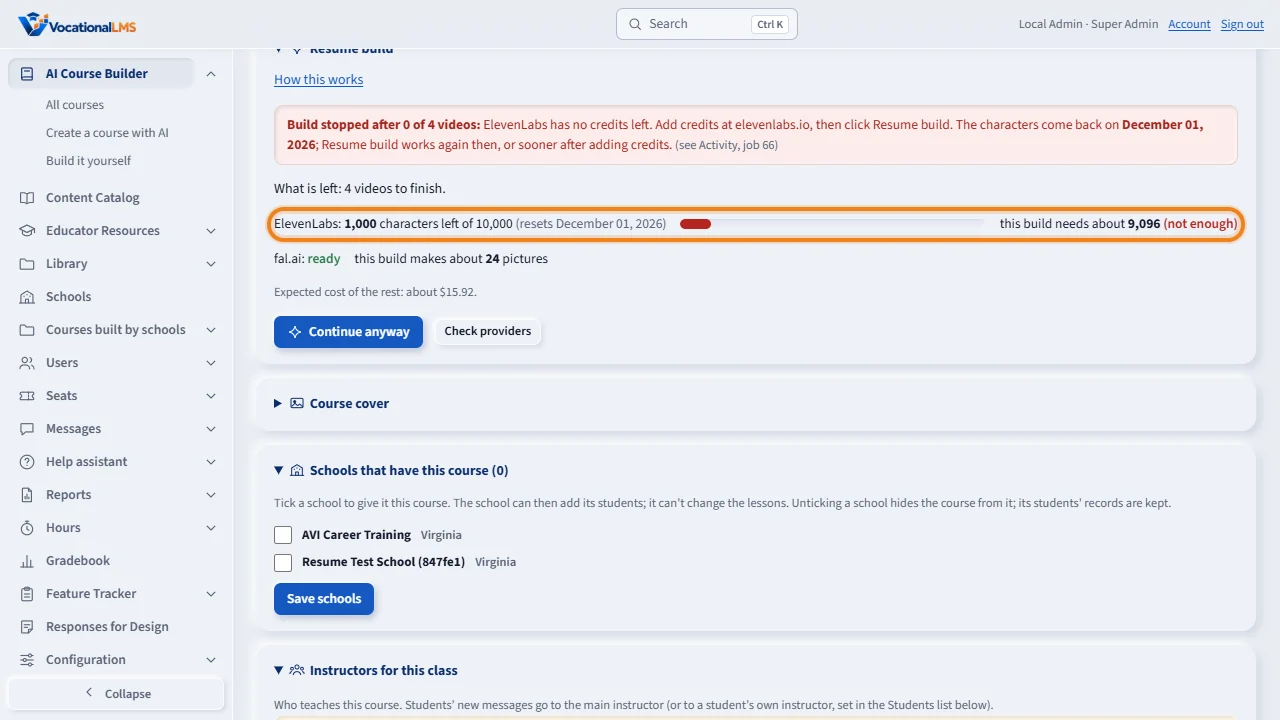
The panel shows how many ElevenLabs characters are left this period against what the rest of the build needs to record. Check providers asks again after you add credits.
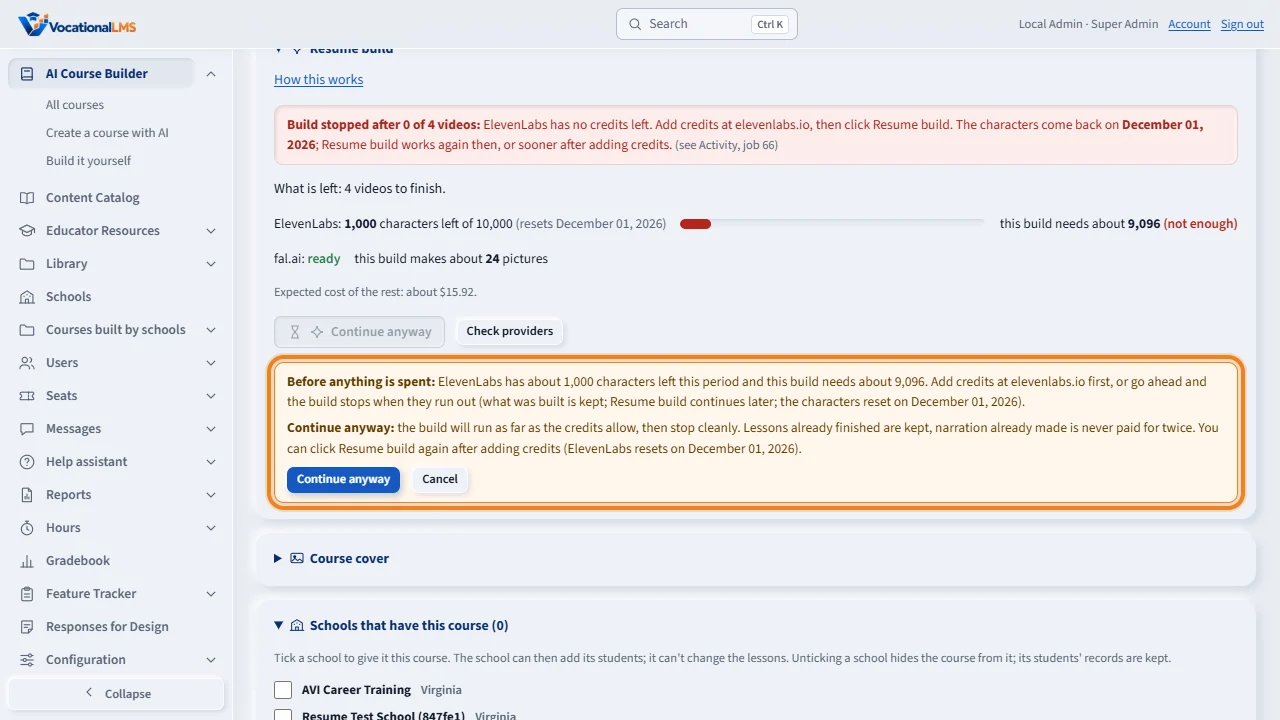
Click Resume build. The pre-flight runs first. When ElevenLabs cannot cover the characters, the panel says so before anything is spent. Cancel, add credits and come back, or Go ahead anyway: the build stops by itself if credits run out, keeps what was built, and Resume build continues later.
One job then runs the steps in order: the lessons still to write, each followed by its video; the videos of written lessons; then readings and chapter tests if the build included them. Approved lessons, lessons with a video, and imported lessons are never touched.
Open this in VocationalLMSAI Course Builder > a course > Resume build
Who can do this: The VocationalLMS Super Admin on master courses; a School Admin on a course their own school builds with AI (A-82).
What it is for
An AI build is many steps: lessons written, narration recorded, videos built, readings and chapter tests. One account problem used to make every remaining lesson fail one by one (in October 2026, 200 lessons of the Basic Esthetics course failed because ElevenLabs had no credits left) and then the course page offered no clear way on. Now a job stops at the first account-level refusal (ElevenLabs quota or key, the Anthropic key or credit, the fal.ai key) with plain words about what is wrong and what to do; the lessons it never reached keep their status. Passing trouble (a rate limit, a server error, a timeout) is tried up to three times with a short wait before it counts. The course's card and page say Build stopped: ElevenLabs has no credits (or fal.ai has no credits: the picture service), and the course page shows a Resume build panel: which provider stopped it and after how many videos, What is left (lessons to write, videos to finish, readings and chapter tests missing), the ElevenLabs characters left against what the build needs (and the date they reset), the picture service's state and the pictures the build makes, and the buttons. You can always continue (#344): the pre-flight is advice, never a lock. When a provider is short or locked the main button reads Continue anyway and the build runs as far as the credits allow, then stops cleanly with the right reason; when the picture service (fal.ai) is the one that is empty, Continue without pictures builds the videos with their slide text and never calls it, and Add pictures to lessons (V-57) fills the pictures in later.
Steps
When a build stops
- Read the reason: the panel names the provider that stopped the build and after how many videos (Build stopped after 22 of 295 videos: fal.ai has no credits left), taken from the job that stopped, and in Activity (the job's row and View details). Fix the cause if you want to: add credits at elevenlabs.io or fal.ai/dashboard/usage-billing/credits (or console.anthropic.com), or fix the key under Configuration > Providers (V-56). You do not have to: see Continue anyway and Continue without pictures below.
- The lessons the job never reached are untouched: still Outline (waiting) or Written, not Error. Only the lessons being worked on at that moment (up to three are written at a time) show the error; a lesson written in that moment keeps its text and only waits for its video.
Resume build
- Open the course. The Resume build panel sits under the title. What is left counts exactly what will be done: lessons to write (each followed by its voice-over and video), videos to finish for lessons already written, and readings or chapter tests only when the course's build included them and some are missing.
- The panel shows how many ElevenLabs characters are left this billing period against what the build still needs to record (exact for written lessons, an average for lessons still to write) and the date they reset, and the picture service line (fal.ai or Higgsfield): ready, no credits left (locked) or key refused, with the pictures this build makes and their price. The picture service is checked without making a picture. Check providers asks again.
- Click Resume build. The pre-flight runs first: when every provider can cover the work the build starts at once. When one cannot, the panel says so before anything is spent and the button reads Continue anyway.
- Continue anyway: the panel explains in plain words and asks you to confirm: the build will run as far as the credits allow, then stop cleanly. Lessons already finished are kept, narration already made is never paid for twice. You can click Resume build again after adding credits (ElevenLabs resets on the date shown). Nothing is ever locked: the Super Admin can always continue.
- Continue without pictures (shown when the picture service is empty or its key is refused, or when it is what stopped the build): the videos are built now with their slide text and no pictures; fal.ai is not called at all, so an empty fal.ai account cannot stop the build. The lessons keep their picture descriptions: when fal.ai has credits again, Add pictures to lessons (V-57) makes the pictures and draws those videos again without recording anything. Activity says Pictures skipped for such a run.
- One job runs the steps in order (Activity shows Step 1 of 3: writing 12 lessons...). Approved lessons, lessons that already have a video, and imported or uploaded lessons are never touched; nothing already written is written again. A missing reading is written only for a lesson not yet approved or in review.
Write + voice + build videos and Finish videos
- Those buttons run the same pre-flight for their own work, and offer the same Go ahead anyway / Cancel when a provider cannot cover it.
What happens next
When the job finishes, the panel goes away and the course's label goes back to In progress or Ready. A job that stopped keeps its reason in Activity. If an update restarts the server during a resumed build, the rest is queued again by itself.
What happens to a build during a deploy
A course build now runs for days, and VocationalLMS is updated while builds run. An update no longer waits for a build to end and no longer cuts one off: when a deploy starts, every running build pauses at its next lesson boundary (after the lesson's video or pictures are saved, before the next lesson starts; usually within 15 to 20 minutes), the course card and the Resume build panel say Paused for a deploy (a neutral label, not Build stopped), and the job's row in Activity reads Paused for a deploy after 12 of 273 videos; resumes automatically. Once the updated server is live, the paused build goes on by itself from the next lesson, on the new server, within a few minutes; the old row then reads resumed automatically as job N. Nothing in the middle of a lesson is interrupted, so nothing is recorded, drawn or paid for twice, and you never have to click anything. The Resume build buttons wait while a build is paused (the panel says so) and come back when it is running again.
Common problems
| # | Problem | What to do |
|---|---|---|
| 1 | The panel says Build stopped but every lesson looks fine. | The last job ended in error (its row in Activity says why). Resume build with nothing left simply says so; otherwise it continues. |
| 2 | Resume build says ElevenLabs cannot cover the characters. | Add credits at elevenlabs.io and click Check providers. Or Continue anyway: the build runs until the characters run out, what was built is kept, and Resume build continues later (the panel shows the date the characters reset). |
| 3 | The panel says fal.ai has no credits left (the picture service). | Add credits at fal.ai/dashboard/usage-billing/credits and click Check providers; or Continue without pictures: the videos are built with their slide text, and Add pictures to lessons (V-57) fills the pictures in once fal.ai has credits. |
| 4 | The panel names the wrong provider. | It names the provider from the last build job that ended (Activity shows it); a job running now is the continuation, not the reason. If a lesson's own row says something older, the job's reason still wins. Tell us if the two disagree. |
| 5 | A lesson keeps failing for a reason that is not a provider. | Open the lesson (its row says the reason), fix or rewrite it with Write, then Resume build again for the rest. |
| 6 | The button is gray. | Work is running on the course now (the panel says so), or nothing is left. A provider being short never grays the button: it reads Continue anyway instead. |
See also
- V-04 Write the lessons, record the voice-over and build the videos
- V-06 Quiz questions: choose AI questions, write your own, set the rules
- V-56 Providers: the ElevenLabs, Anthropic and fal.ai keys, in Configuration
- V-57 Lesson pictures: a realistic picture on every slide of a lesson video, made when the video is built
- A-82 Resume build: continue an AI build that stopped
- AI Course Builder (full guide)