
A-82For School Admins and Directors
Resume build: continue an AI build that stopped
If the AI build of a course your school is making stops (a provider out of credits, a key problem, an update), the course says Build stopped, which provider and why, and Resume build continues with only what is unfinished: Continue anyway runs as far as the credits allow; Continue without pictures builds the videos with no slide pictures.
How-to video A-82 · 0:33
Read the words of this video
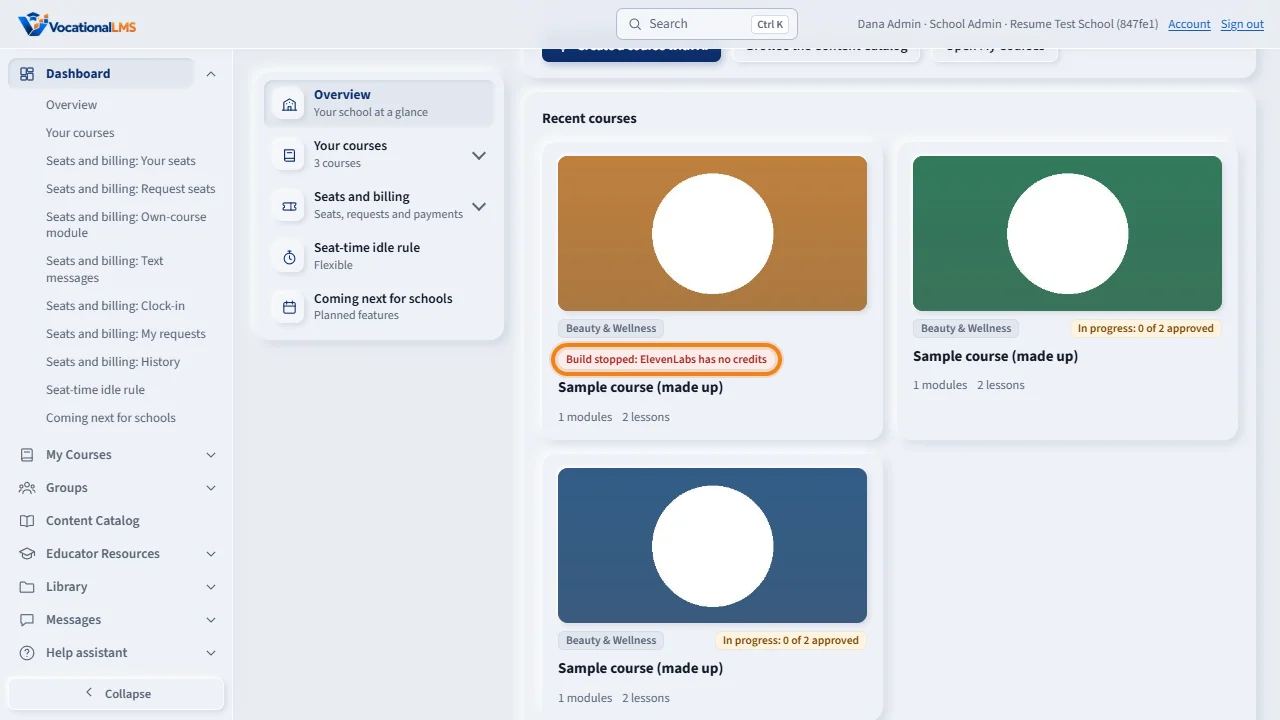
If the AI build of a course your school is making stops, its card on My Courses says Build stopped, and why. Open the course.
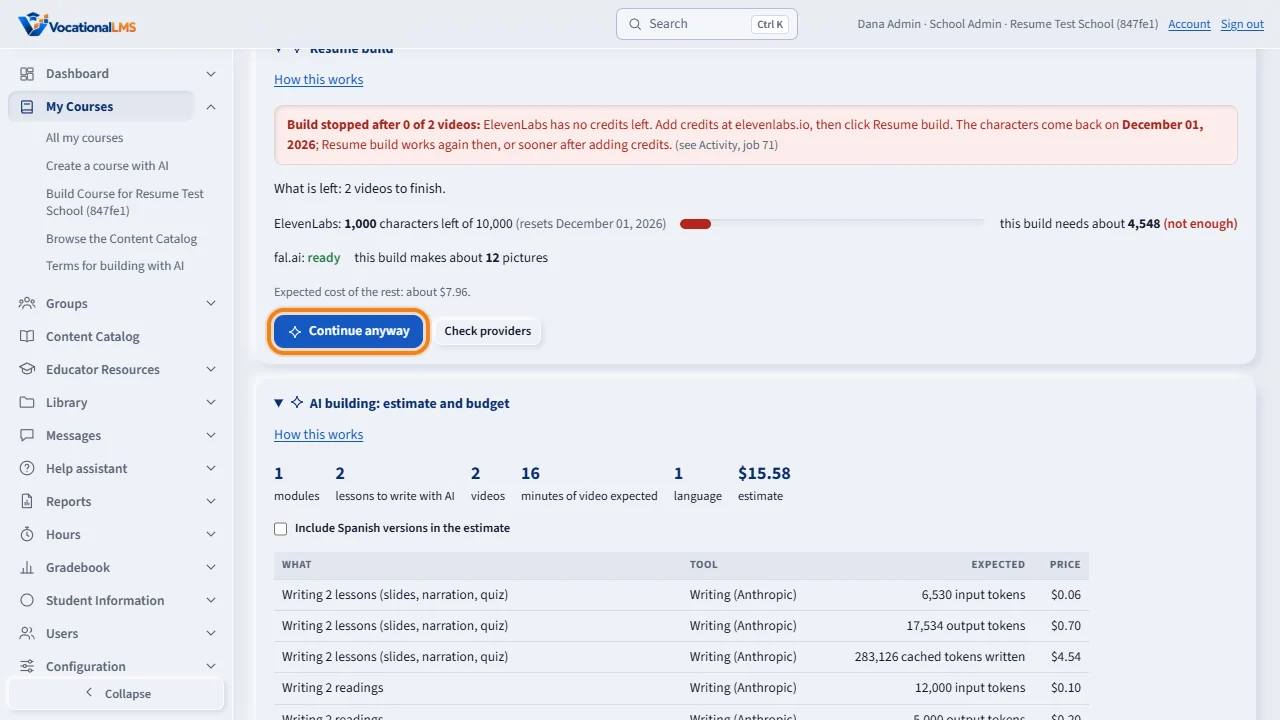
The Resume build panel says why it stopped and what is left. Click Resume build: the providers are checked first, and then one job continues with only the unfinished lessons, videos, readings and tests. Approved lessons and finished videos are never touched, so nothing is paid for twice.
Open this in VocationalLMSAI Course Builder > a course > Resume build
Who can do this: The School Admin of the school (the Director and instructors can see the panel; starting the build is the School Admin's).
What it is for
An AI build of your own course is many steps: lessons written, narration recorded, videos built, readings and chapter tests. If a provider refuses for an account reason, the job stops at once with the reason, instead of failing every remaining lesson; passing trouble is tried again by itself. The course's card says Build stopped and why, and the course page shows a Resume build panel with What is left and the button. Your budget (A-72) is only used for what is actually built; Resume build does not start when the rest of the build would not fit the budget.
Steps
- Open My Courses: the card says Build stopped and the reason in short. Open the course.
- Read Resume build under the title: the reason in full, and What is left (lessons to write, videos to finish, readings or chapter tests missing). Nothing already done is counted.
- If the reason is a provider (ElevenLabs characters, the picture service fal.ai, the AI key), VocationalLMS fixes it on its side; a message under Help tells us. You do not have to wait: click Resume build. The pre-flight checks the providers first; when something cannot be covered it says so before anything is spent and the button reads Continue anyway: the build runs as far as the credits allow, then stops cleanly. Lessons already finished are kept, narration already made is never paid for twice, and Resume build works again later.
- Continue without pictures (shown when the picture service is empty, or when it is what stopped the build): the videos are built now with their slide text and no pictures; the picture service is not called at all. Later, Add pictures to lessons (A-83) fills the pictures in and draws those videos again without recording anything.
- One job runs the rest in order; Activity shows each step. Approved lessons and lessons that already have a video are never touched, so nothing is paid for twice.
What happens next
When the job finishes, the panel goes away and the course's label goes back to In progress or Ready. The same budget rules apply as for any AI job: Resume build does not start when the rest would not fit the course's budget (A-72). If VocationalLMS is updated while your build runs, the card says Paused for a deploy for a few minutes and the build goes on by itself from the next lesson; nothing is paid for twice.
Common problems
| # | Problem | What to do |
|---|---|---|
| 1 | The button is gray. | Work is running on the course now, or nothing is left. A provider being short never grays it: it reads Continue anyway instead. |
| 2 | Resume build is refused for the budget. | The rest of the build does not fit the course's budget. Top up under AI building: estimate and budget (A-72), then click again. |
| 3 | The panel says fal.ai has no credits left. | That is the picture service. Continue without pictures builds the videos now; Add pictures to lessons (A-83) fills the pictures in once VocationalLMS has topped it up. |
| 4 | A lesson keeps failing for a reason that is not a provider. | Open the lesson, fix or rewrite it with Write, then Resume build again for the rest. |
See also
- A-72 Build a course with AI: the estimate, paying, and your budget
- A-22 The own-course module: price by students, request or renew it, pay, upgrade, and what locked means
- A-83 Lesson pictures on the videos your school builds
- V-55 Resume build: continue a build that stopped, after a pre-flight check
- Build your own course (full guide)