
V-06For the VocationalLMS Super Admin
Quiz questions: choose AI questions, write your own, set the rules
Tick the questions to keep, ask for more from chosen slides, and set pass mark, tries and feedback.
How-to video V-06 · 0:57
Read the words of this video
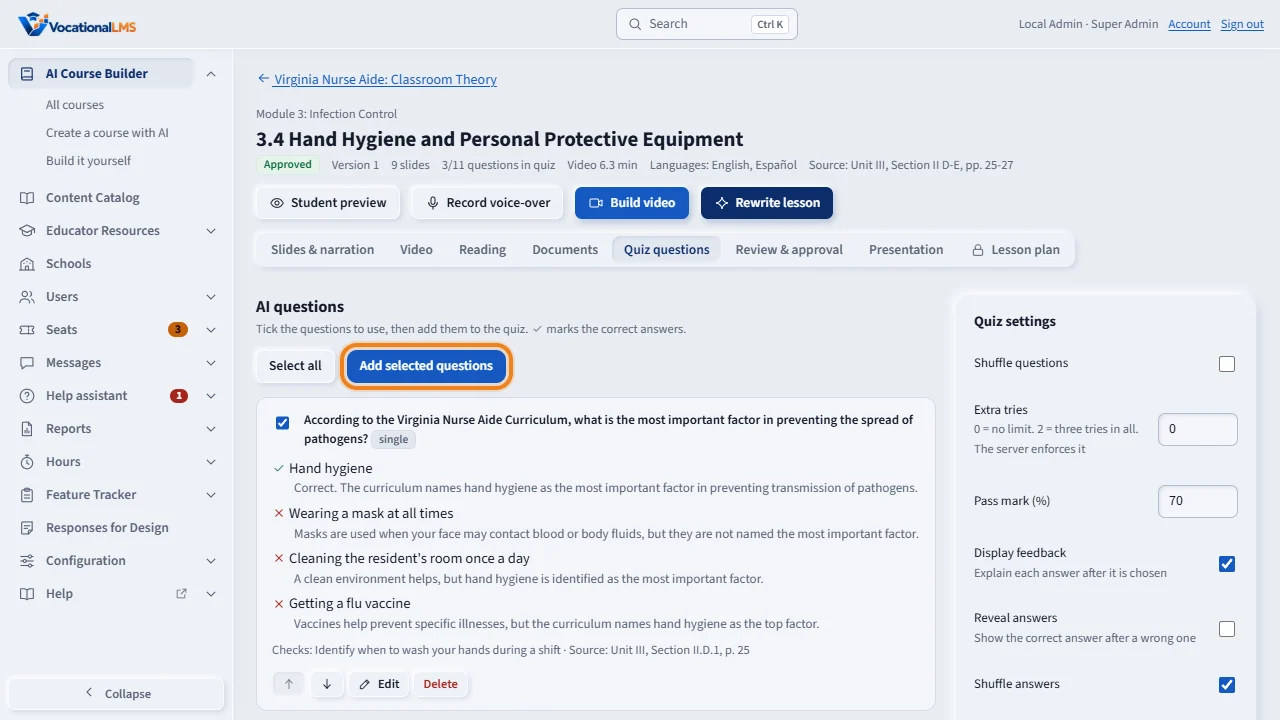
Each AI-written lesson comes with quiz questions. Open the lesson and click Quiz questions. Tick the questions you want in the quiz, and click Add selected questions.
Every question shows the correct answer, the feedback for each choice, and the unit and page of the curriculum it came from. Edit changes a question, and Delete removes it.
Lower on the page, you can ask the AI for more questions from the slides you choose, with the number and the kinds you want. You can also write your own questions.
Quiz settings, on the right, set the rules: shuffle the questions, extra tries, the pass mark, feedback, reveal answers, shuffle the answers and allow skipping. Click Save settings. Quizzes are graded on the server.
Open this in VocationalLMSCourses > a lesson > Quiz
What it is for
Each AI-written lesson comes with quiz questions. Every question shows its correct answer, feedback, and where in the curriculum it came from. You decide which ones go into the quiz and how the quiz behaves.
Steps
- Open a lesson and click Quiz questions.
- Tick the questions you want and click Add selected questions.
- To get more, ask the AI for questions from chosen slides: pick the slides, the number and the kinds.
- Write your own with Write a question; Edit and Delete change any question.
- Under Quiz settings set Shuffle questions, Extra tries, Pass mark, Display feedback, Reveal answers, Shuffle answers and Allow skipping, then Save settings.
What happens next
Quizzes are graded on the server. Students see the correct answers only after they submit. Changing a question of an approved lesson sends it back for review.
Common problems
| # | Problem | What to do |
|---|---|---|
| 1 | A question is wrong for your state. | Edit it, or untick it and write your own. |
| 2 | Students run out of tries. | Extra tries 0 means no limit. |