
A-22For School Admins and Directors
The own-course module: price by students, request or renew it, pay, upgrade, and what locked means
From $250.00 a month for up to 15 active students in your own courses: choose your tier and months, pay with PayPal or by check, upgrade when your places are used.
How-to video A-22 · 2:09
Read the words of this video
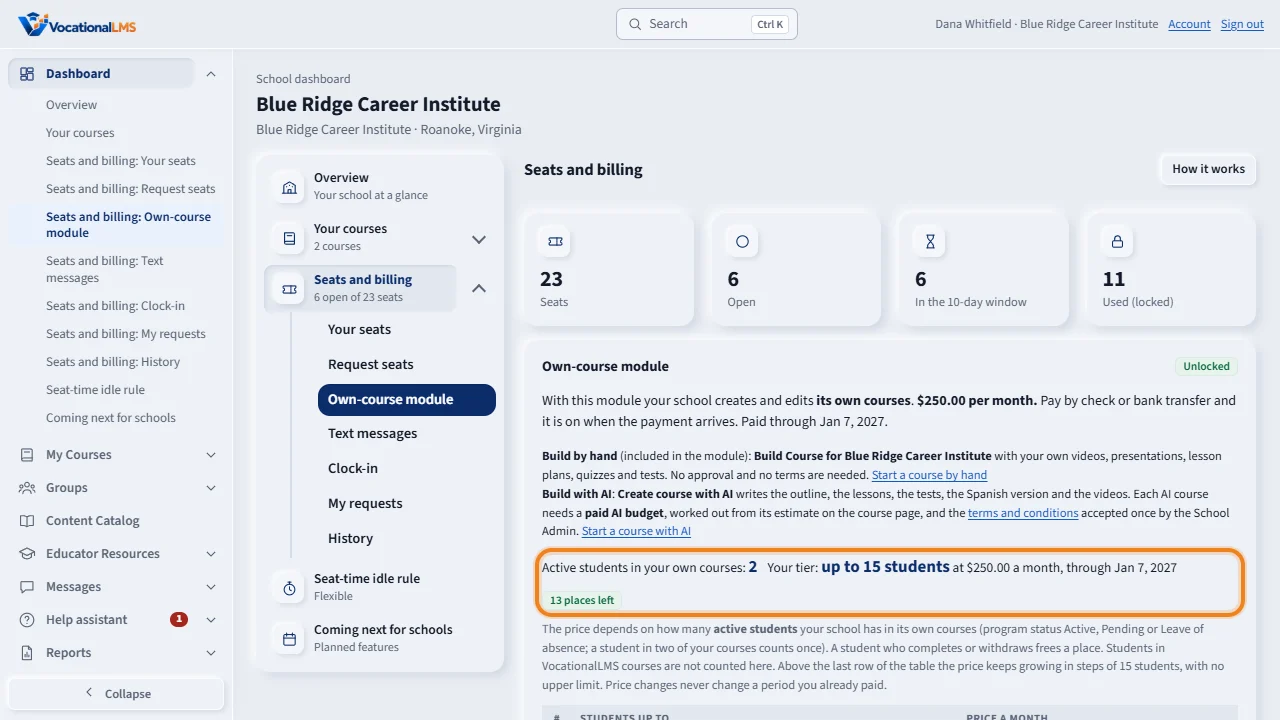
The own-course module lets your school create and edit its own courses, and enroll students in them. Its monthly price depends on how many active students your school has in those courses: two hundred fifty dollars a month for up to fifteen students, five hundred for up to thirty, one thousand for up to sixty. Above sixty, two hundred fifty dollars more for every further fifteen students, with no upper limit. Open the Dashboard, then Seats and billing, and find Own-course module. It shows your active students, the tier table, and your tier.
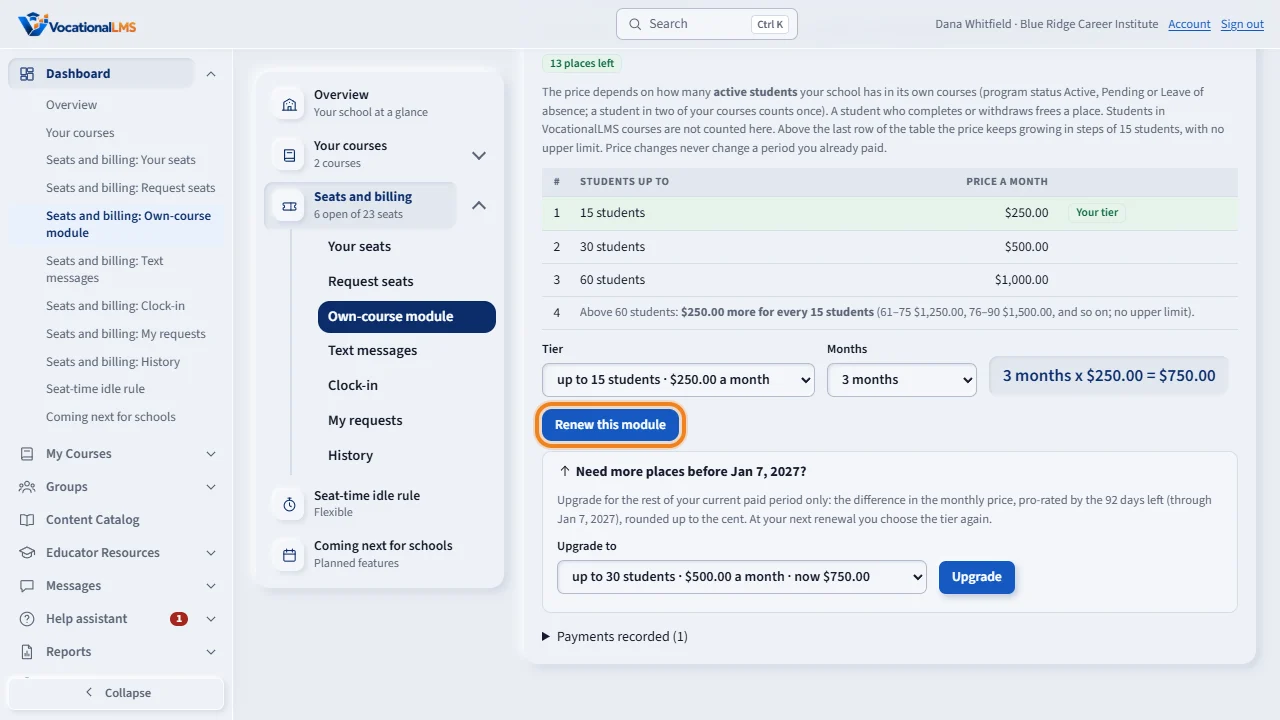
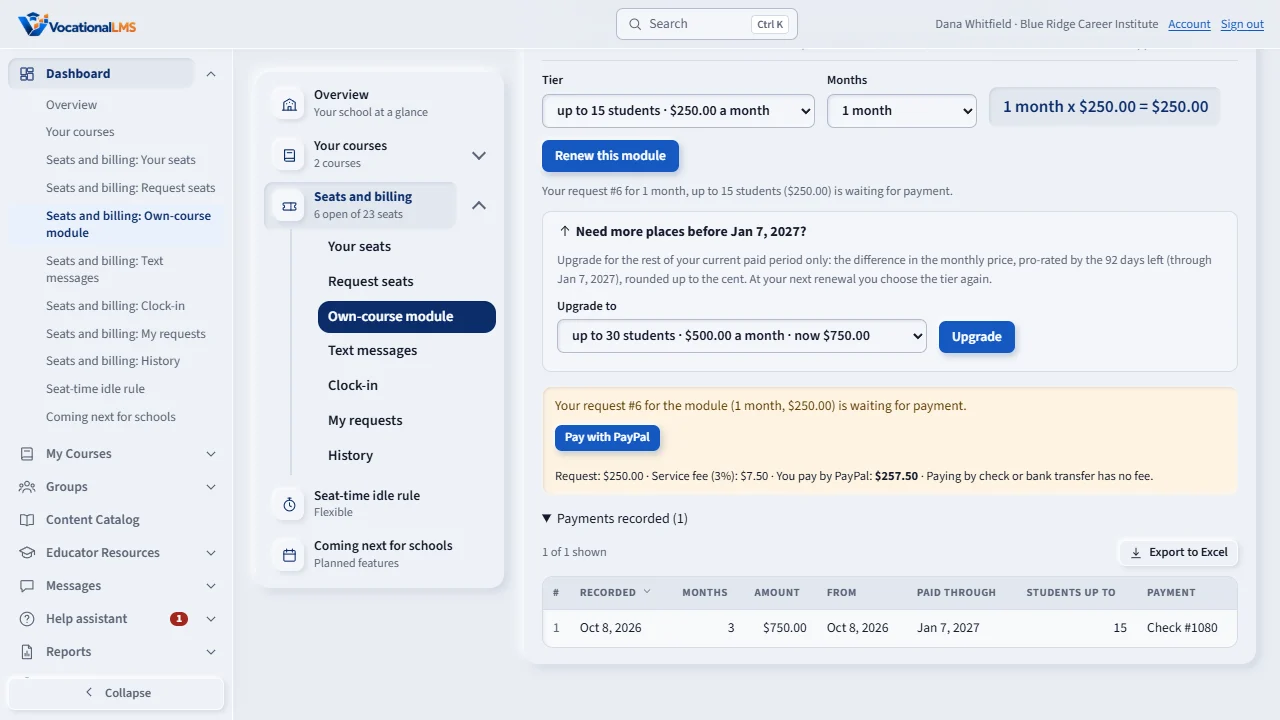
Choose the tier, at least the one your active students need, and the number of months. The page shows the total. Click Request this module, or Renew this module.
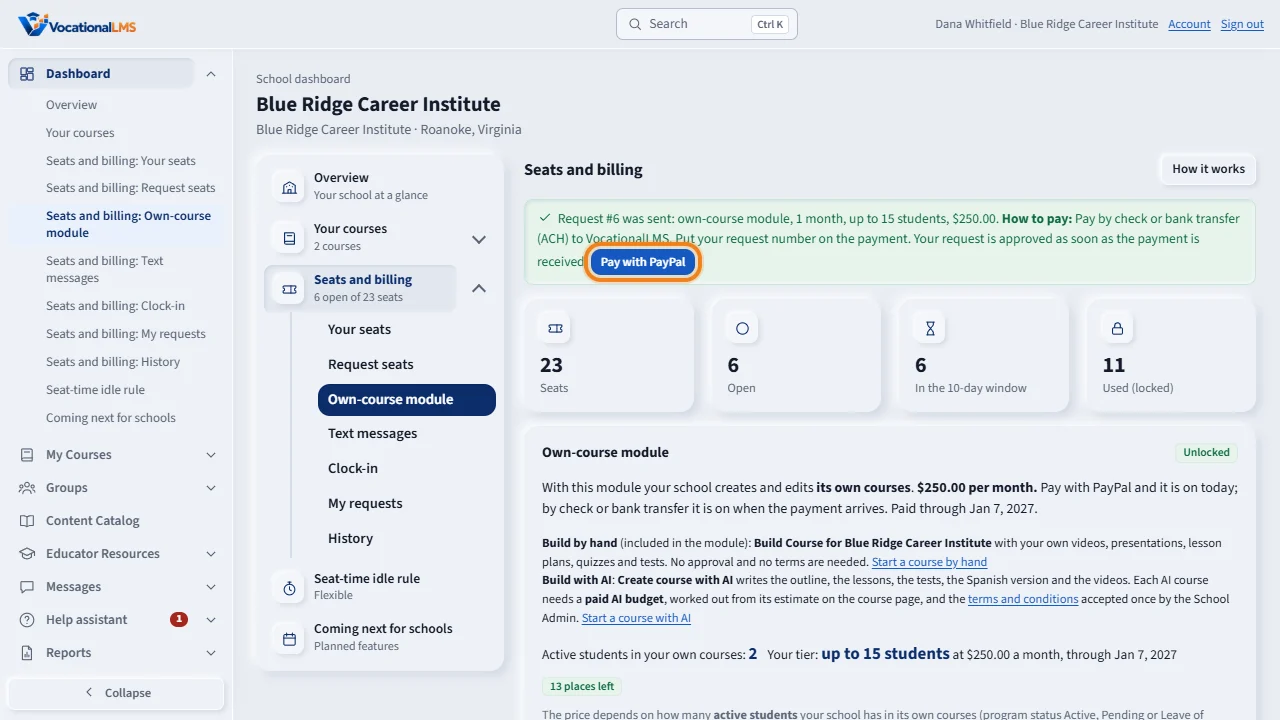
Then pay. Click Pay with PayPal: the exact amount, with the service fee, is shown before you go to PayPal, and the request is approved at once, so the module is on today. Or pay by check or bank transfer as described under How to pay; the module is on when VocationalLMS records the payment.
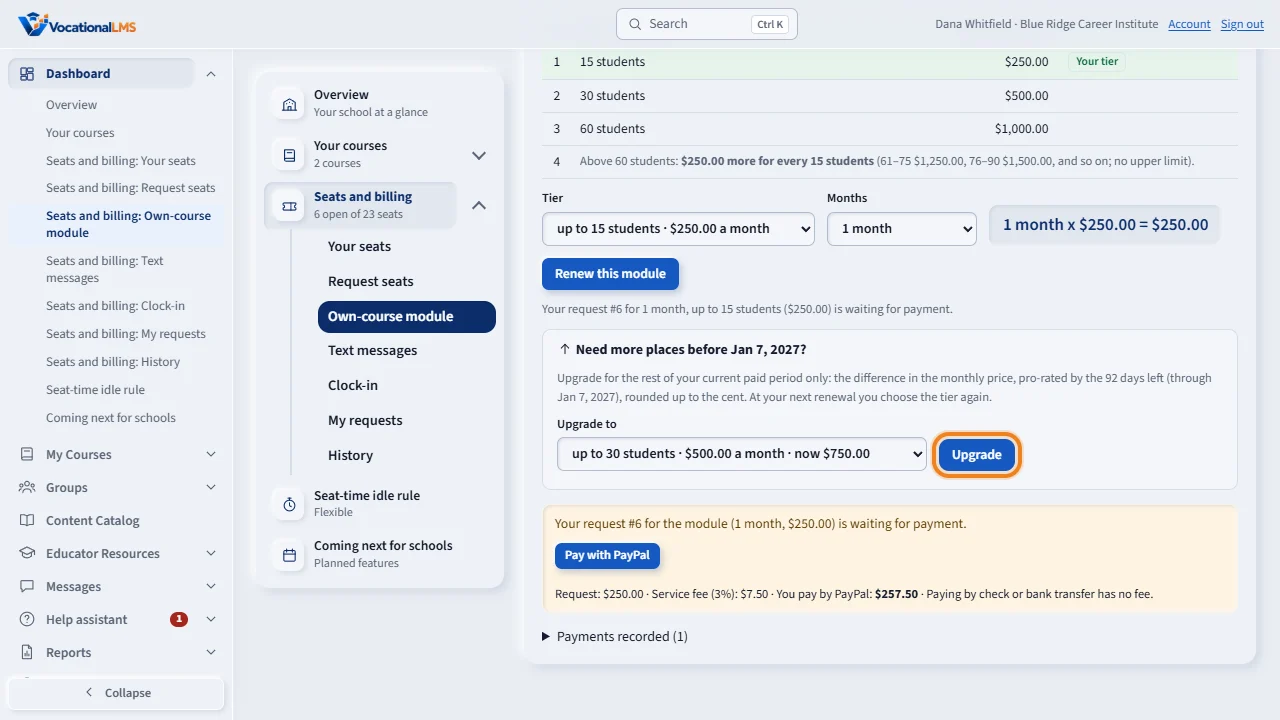
When your places are used, a new enrollment in an own course is refused with the reason, and you can click Upgrade. It costs the difference in the monthly price for the days left in your paid period, rounded up to the cent. Paid, your places rise at once. At your next renewal you choose the tier again. A student who completes or withdraws frees a place.
Payments recorded lists what has been paid, the tier, and the paid-through date. You get a reminder seven days before that date, and seven days of grace after it.
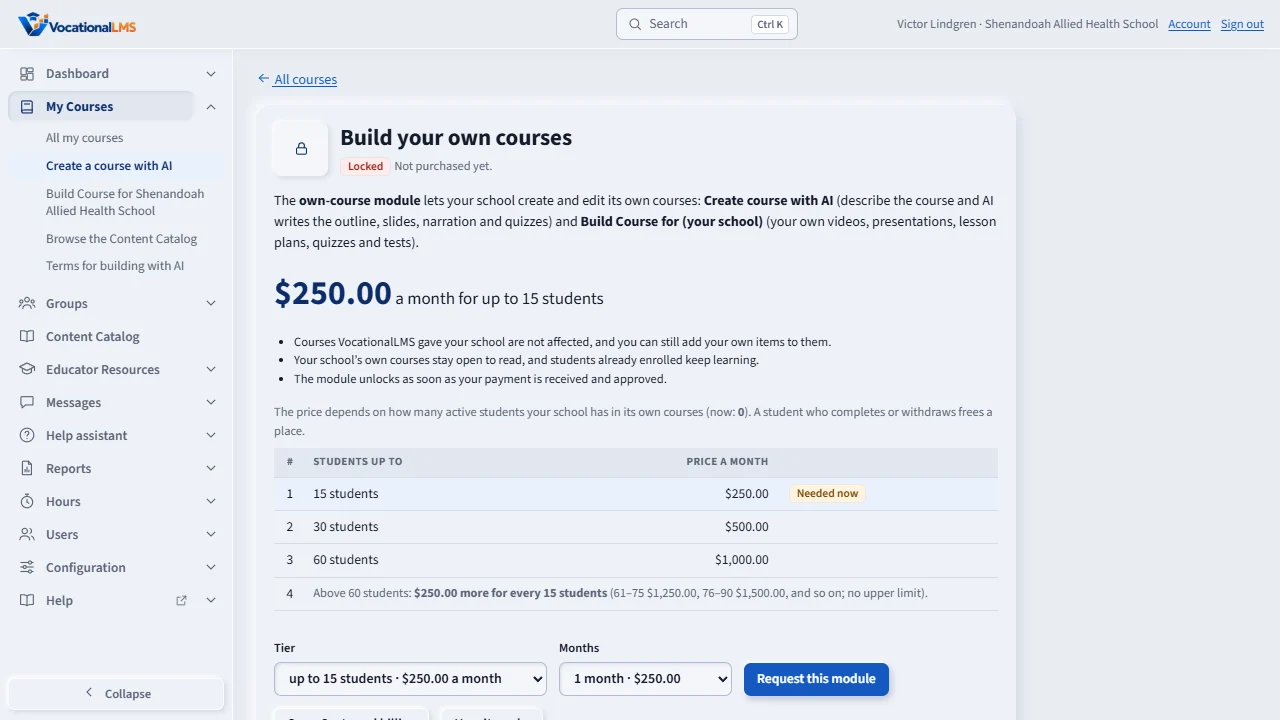
While the module is locked, creating and editing your own courses shows this page, with the tiers and your count. Your own courses can be opened to read only, and students already enrolled keep learning. Courses VocationalLMS gave you are not affected.
Open this in VocationalLMSDashboard > Seats and billing > Own-course module
What it is for
The own-course module lets a school create and edit its own courses with Create course with AI and Build Course for (your school's name), and enroll students in them. It applies only when VocationalLMS has turned it on for your school. Its monthly price depends on how many active students your school has in its own courses: up to 15 students $250.00 a month, up to 30 students $500.00, up to 60 students $1,000.00 (VocationalLMS can set other tiers for your school). Above 60 students the price keeps growing in steps: $250.00 more for every 15 students (61–75 $1,250.00, 76–90 $1,500.00, and so on), with no upper limit. You pay for a tier, students up to N, for the months you choose. A student who completes or withdraws frees a place. Students in VocationalLMS courses are not counted; they use seats (A-20).
Steps
- Open Dashboard > Seats and billing and find Own-course module. It shows your active students in your own courses, the tier table and, once paid, your tier and the places left.
- Choose the Tier (at least the one your active students need; a larger one is fine) and the number of Months. The page shows months x price = total.
- Click Request this module (or Renew this module).
- Pay with PayPal: click Pay with PayPal beside the request. The exact amount, with the service fee (3 percent), is shown before you go to PayPal, and the request is approved at once: the module is on today. Or pay by check or bank transfer as described under How to pay: the module is on when VocationalLMS records the payment.
- Payments recorded lists what has been paid, the tier and the paid-through date.
- When your places are used, an enrollment in an own course is refused with the reason, and the page offers Upgrade: it costs the difference in the monthly price for the days left in your paid period, rounded up to the cent (at least $1.00). Paid, it raises your places at once for the rest of the period. At your next renewal you choose the tier again.
What happens next
You get a reminder 7 days before the paid-through date and again on the day it ends, each naming your tier and price. After that date you still have 7 days of grace to create and edit. You are told when your last place is used. A price changed by VocationalLMS never changes a period you already paid.
Who is counted
| # | Student | Counted? |
|---|---|---|
| 1 | Program status Active, Pending or Leave of absence in one of your own courses | Yes, once, even in two of your courses |
| 2 | Completed, Withdrawn, Canceled, Dismissed or Transferred | No: the place is free again |
| 3 | Enrolled only in VocationalLMS courses | No (seats cover those) |
What locked means
| # | When the module is | Your school can |
|---|---|---|
| 1 | Unlocked (paid through a date) | Create and edit its own courses, and enroll students up to its tier. |
| 2 | Past the date, first 7 days | Still create and edit (grace period). |
| 3 | Locked | Open its own courses to read only. Students already enrolled keep learning. Courses VocationalLMS gave you are not affected, and you can still add your own items to them. |
Common problems
| # | Problem | What to do |
|---|---|---|
| 1 | Create course with AI shows a locked page. | Click Request this module on that page (choose the tier and months), or request it here. |
| 2 | A student can't be enrolled in your own course: the message says the module allows 15. | Your 15 places are used. Click Upgrade on the message or under Own-course module and pay the difference for the days left, or free a place (a student who completes or withdraws is no longer counted). |
| 3 | Your school has more students than the last row of the table. | Nothing stops you: the table continues by itself, $250.00 more a month for every further 15 students. Choose that tier (for example up to 75 students at $1,250.00) when you request, renew or upgrade; the chooser lists it. |
| 4 | Do students in our own courses need seats? | Yes, when your school uses seats. VocationalLMS can set that price to $0.00. |