
A-71For School Admins and Directors
Your own courses: the module, the terms, and who owns what
The own-course module: pay and it is on. Two ways to build (by hand, or with AI). The terms your School Admin accepts once before the first AI build: the full text, what it says about ownership, and what your acceptance means.
How-to video A-71 · 2:21
Read the words of this video
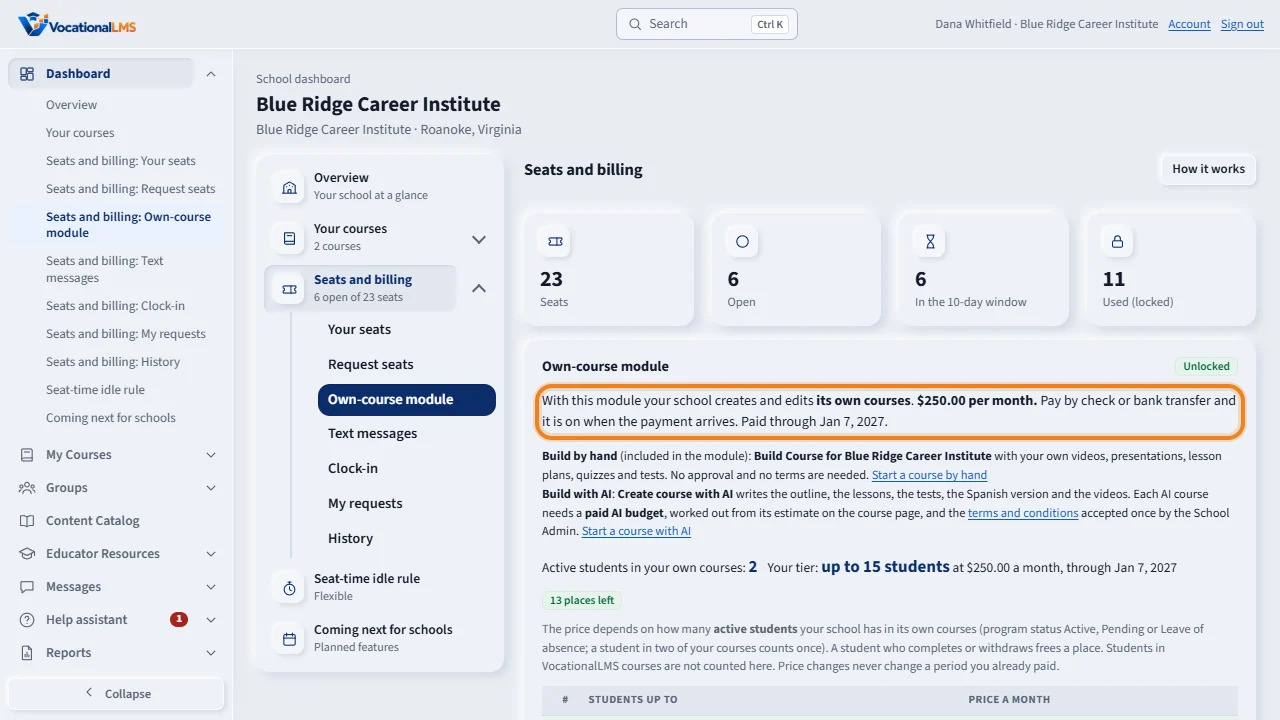
The own-course module lets your school build its own courses. It costs two hundred fifty dollars per month. Pay with PayPal and it is on today; by check or bank transfer it is on when the payment arrives. Nobody at VocationalLMS has to click anything.
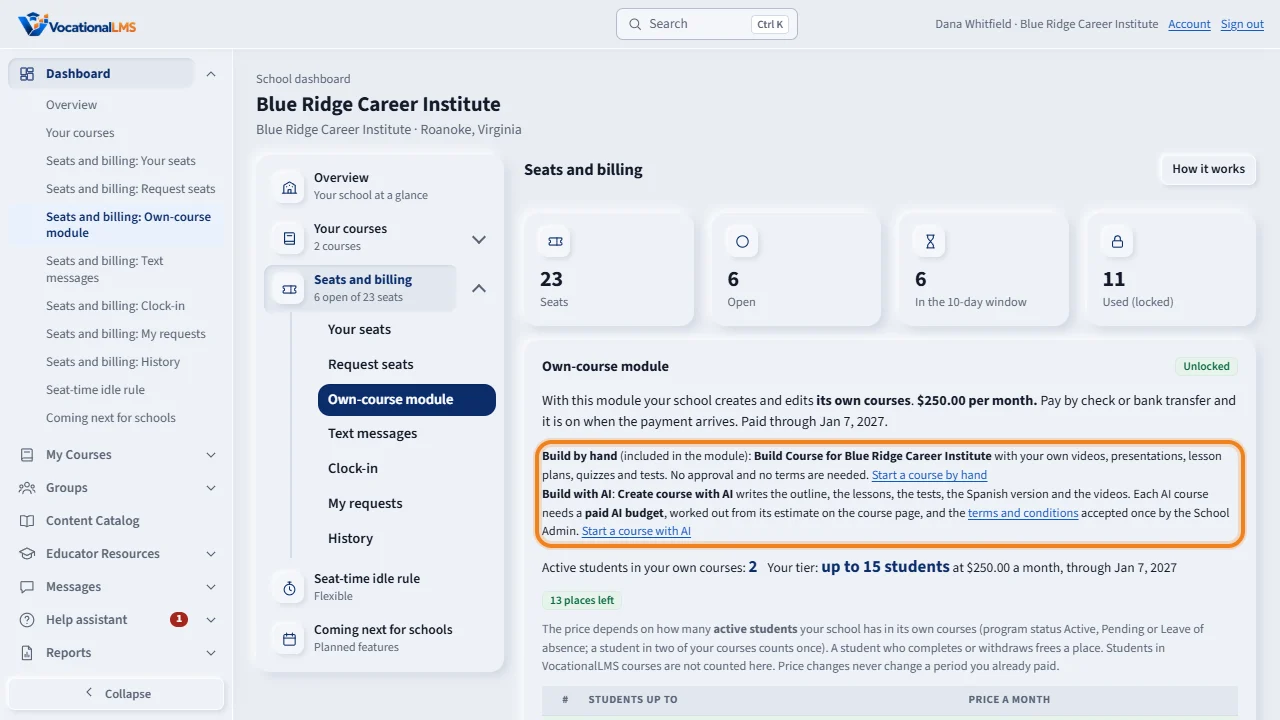
There are two ways to build. By hand is included: Build Course for your school, with your own videos, presentations, quizzes and tests. With AI, Create course with AI writes the outline, the lessons, the tests and the videos. Each AI course needs a paid AI budget, and the terms accepted once by the School Admin.
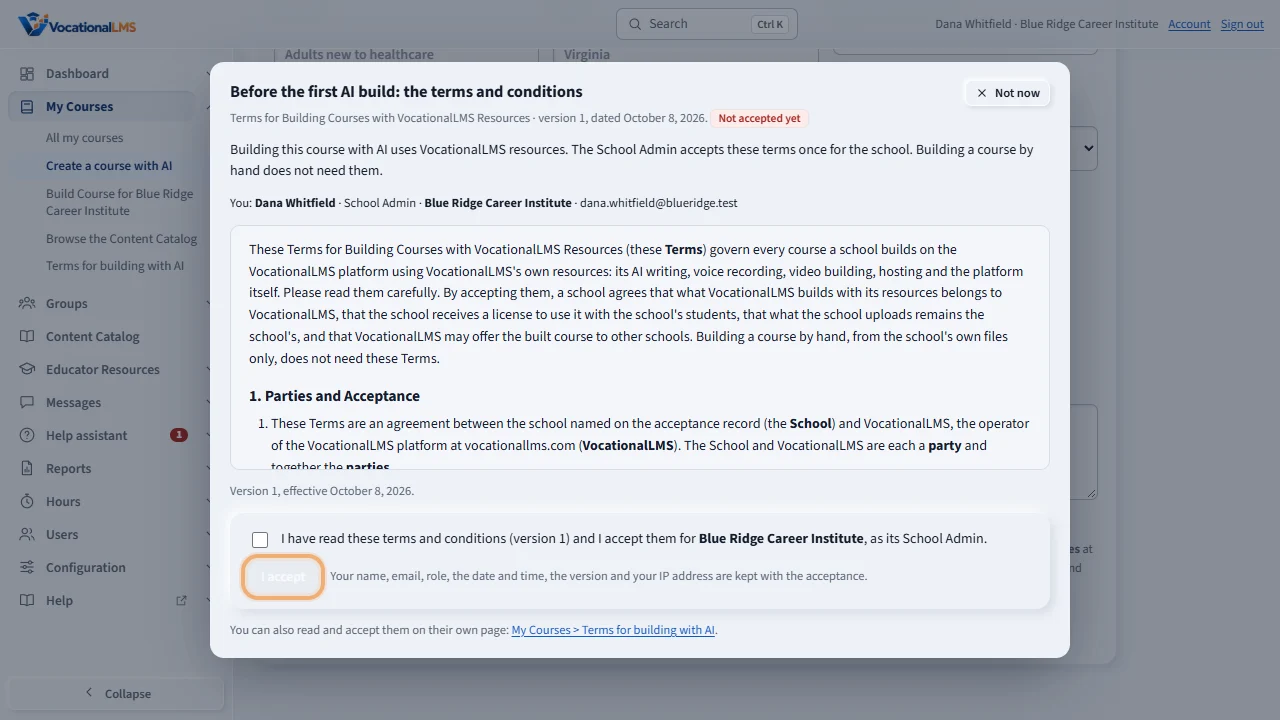
If you start Create course with AI before the terms are accepted, the terms open in a dialog. Nothing is started until they are accepted. You can read and accept them here, or on their own page.
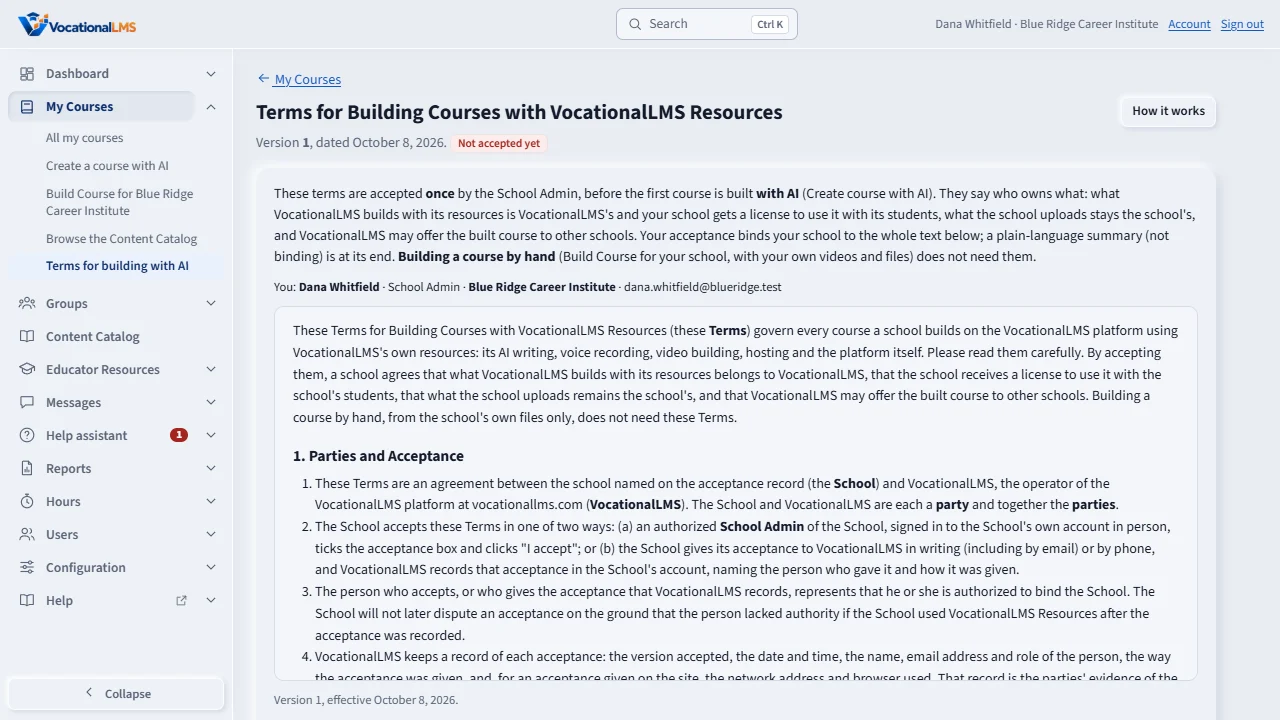
The page My Courses, then Terms for building with AI, shows the version, its date and the whole text: seventeen numbered sections, with a plain-language summary at the end. In short: what VocationalLMS builds with its resources belongs to VocationalLMS, and your school gets a license to use it with its students. What you upload stays yours, and you promise that you have the rights to it. VocationalLMS may offer the built course to other schools.
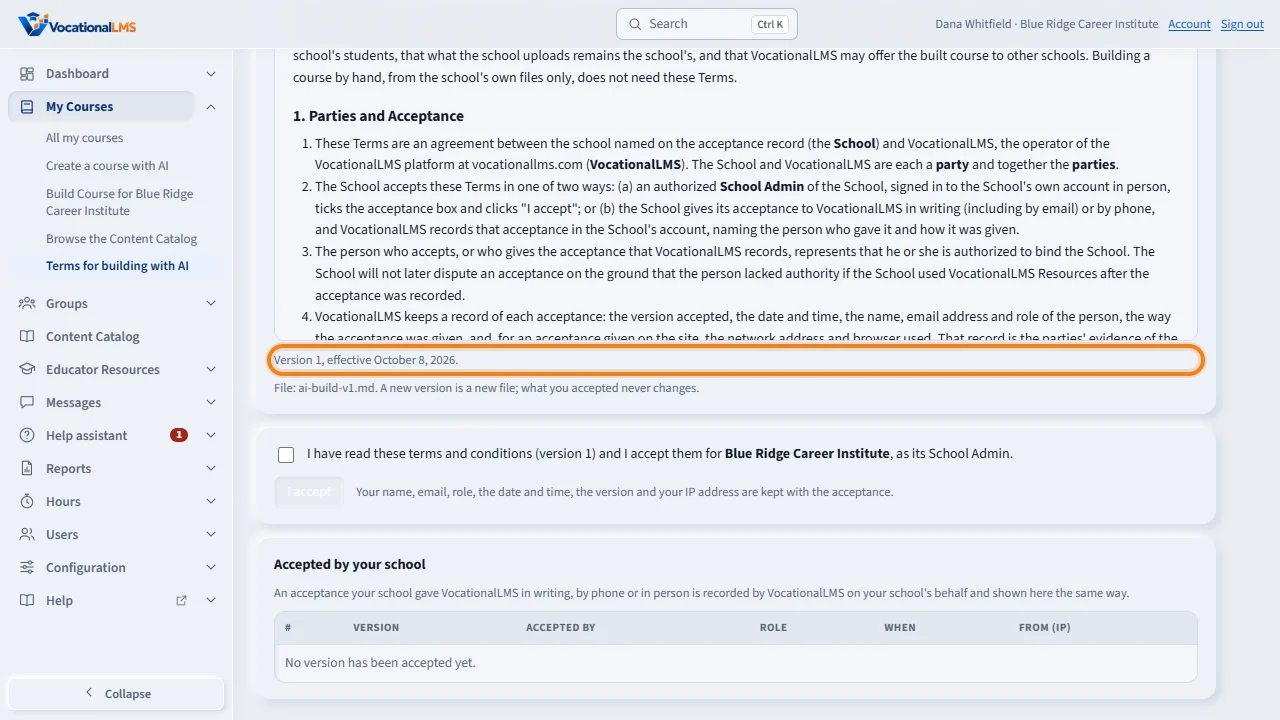
Under the text, one line says which version is in force and from when: Version one, effective October eighth, twenty twenty-six. Your acceptance binds your school to the whole text, not only to the summary, so read it all. A new version is a new file, and what you accepted never changes.
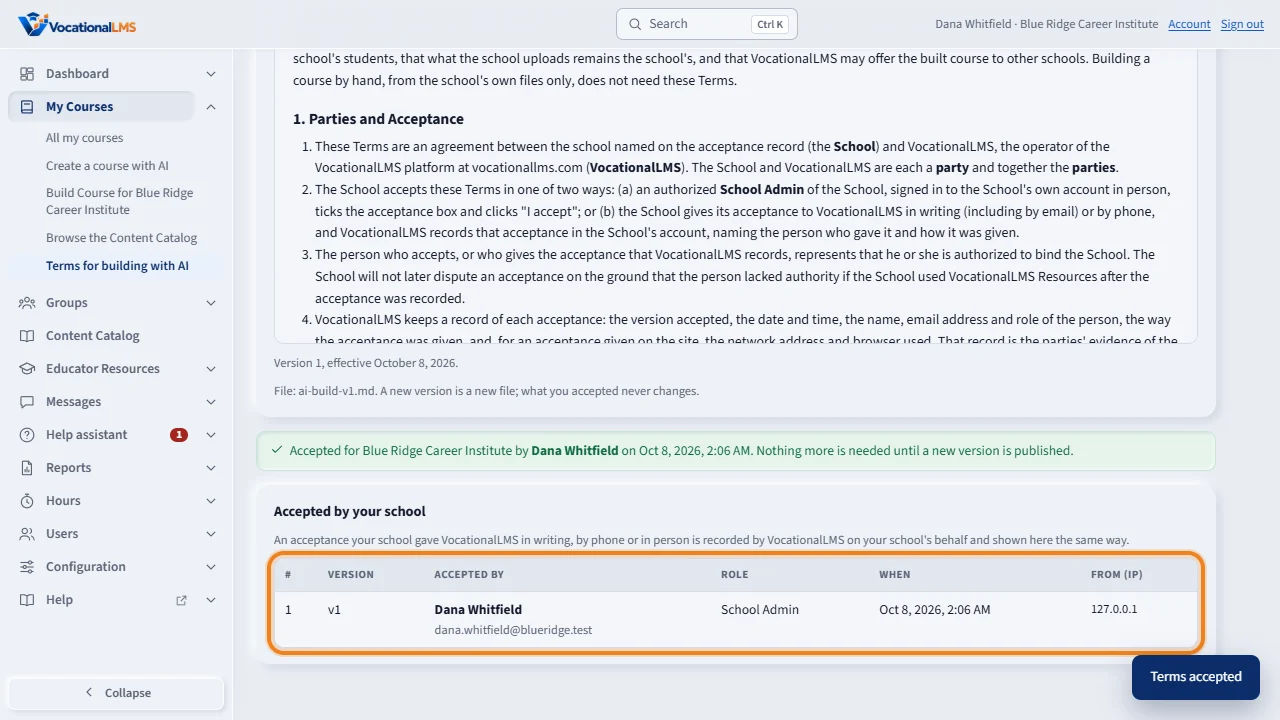
Your name, your role and your school are shown above the text. Tick the box, and click I accept. Only the School Admin can do this, in person. The history lists every version your school accepted, by whom and when. If your school gave its acceptance in writing or by phone instead, VocationalLMS records it for you, and the history says so: recorded by VocationalLMS on behalf of your school. Building a course by hand never needs the terms.
Open this in VocationalLMSDashboard > Seats and billing > Own-course module
Who can do this: The School Admin pays for the module and accepts the terms. Directors and instructors can read the terms and the history.
What it is for
With the own-course module ($250 per month) your school builds its own courses. Pay with PayPal and it is on today; by check or bank transfer it is on when the payment arrives. Nobody at VocationalLMS has to click anything. There are two ways to build. By hand (included in the module): Build Course for (your school), with your own videos, presentations, lesson plans, quizzes and tests. With AI: Create course with AI writes the outline, the lessons, the tests, the Spanish version and the videos; each AI course needs a paid AI budget worked out from its estimate, and the Terms for Building Courses with VocationalLMS Resources accepted once by the School Admin. The terms are a complete agreement (17 numbered sections and a plain-language summary at the end; Version 1, effective October 8, 2026). In short: what VocationalLMS builds with its resources is VocationalLMS's, and your school gets a license to use it with its enrolled students on VocationalLMS while it is a customer; what you upload stays yours, and you promise you have the rights to it, that it holds no textbook, publisher or vendor material without written permission, and no student personal information; VocationalLMS may copy the built course into its catalog and offer it to other schools, without paying the school; the estimate is an estimate and the prepaid budget is not refunded; you are responsible for checking the content and your state's, board's and accreditor's rules; VocationalLMS's liability is limited; Virginia law applies. What your acceptance means: it binds your school to the whole text, not only the summary; VocationalLMS keeps who accepted, when, from which address and which version. If your school gives its acceptance in writing or by phone instead, VocationalLMS records it on your school's behalf, and your terms page shows it as Recorded by VocationalLMS on behalf of (name).
Steps
Pay for the module and it is on
- Open Dashboard > Seats and billing > Own-course module. The panel says the price and the two ways to build.
- Choose the months and click Request this module (or Renew this module).
- Click Pay with PayPal beside the request and pay. The module is on at once: Create course with AI and Build Course for (your school) open. With a check or bank transfer, it is on when VocationalLMS records the payment.
Read and accept the terms (once, before the first AI build)
- Open My Courses > Terms for building with AI. The page shows the version and its date, the whole text (17 numbered sections, with the defined terms in bold and a plain-language summary at the end that is not binding) and, under the text, the line Version 1, effective October 8, 2026.
- Read it all. Your name, your role and your school are shown above the text, because the acceptance is made in your name for the school, and it binds the school to the whole text.
- Tick I have read these terms and conditions and I accept them, then click I accept. Only the School Admin can do this, in person: not VocationalLMS viewing your school, and not from a Log in as session. VocationalLMS keeps your name, email, role, the date and time, the version and your address with the acceptance.
- Accepted by your school lists every version accepted, by whom and when. When VocationalLMS publishes a new version, you accept it again before the next AI build; what you accepted before stays on record.
- If your school gave VocationalLMS its acceptance in writing or by phone instead, VocationalLMS records it for you. The history then shows On the school's behalf and Recorded by VocationalLMS on behalf of (name) (by phone), with the date it was given, and your school can build with AI the same way.
- If you start Create course with AI before accepting, the same text opens in a dialog, and you can accept it there.
Build by hand: no terms needed
- Click My Courses > Build Course for (your school). Your own videos and files do not need the terms, and nothing is paid beyond the module.
What happens next
Courses your school builds are listed for VocationalLMS in its module Courses built by schools, because a course built with VocationalLMS resources is owned by VocationalLMS under the terms. VocationalLMS may copy such a course into its catalog; your own copy is never touched and your students keep learning.
Common problems
| # | Problem | What to do |
|---|---|---|
| 1 | I accept is gray. | Tick the box above it first. If the page says only the School Admin can accept, sign in as the School Admin. |
| 2 | Create course with AI says the terms must be accepted. | Open My Courses > Terms for building with AI, or accept them in the dialog that opens. Building by hand never asks for them. |
| 3 | The page says a new version is in force. | VocationalLMS published a new version of the terms. Read it and accept it; what you accepted before stays on record. |
| 4 | The history says Recorded by VocationalLMS on behalf of (name). | Your school gave its acceptance in writing, by phone or in person, and VocationalLMS recorded it for your school. It counts like an acceptance made here. If that is wrong, write to VocationalLMS. |
| 5 | Can I keep the lessons if we leave VocationalLMS? | No. What VocationalLMS built with its resources stays VocationalLMS's, and the license ends when the own-course module lapses or the school leaves. What you uploaded stays yours and is returned or deleted on request. |