
V-15For the VocationalLMS Super Admin
The own-course module for a school
Turn enforcement on, record payments by the month, and lock or unlock by hand.
How-to video V-15 · 1:05
Read the words of this video
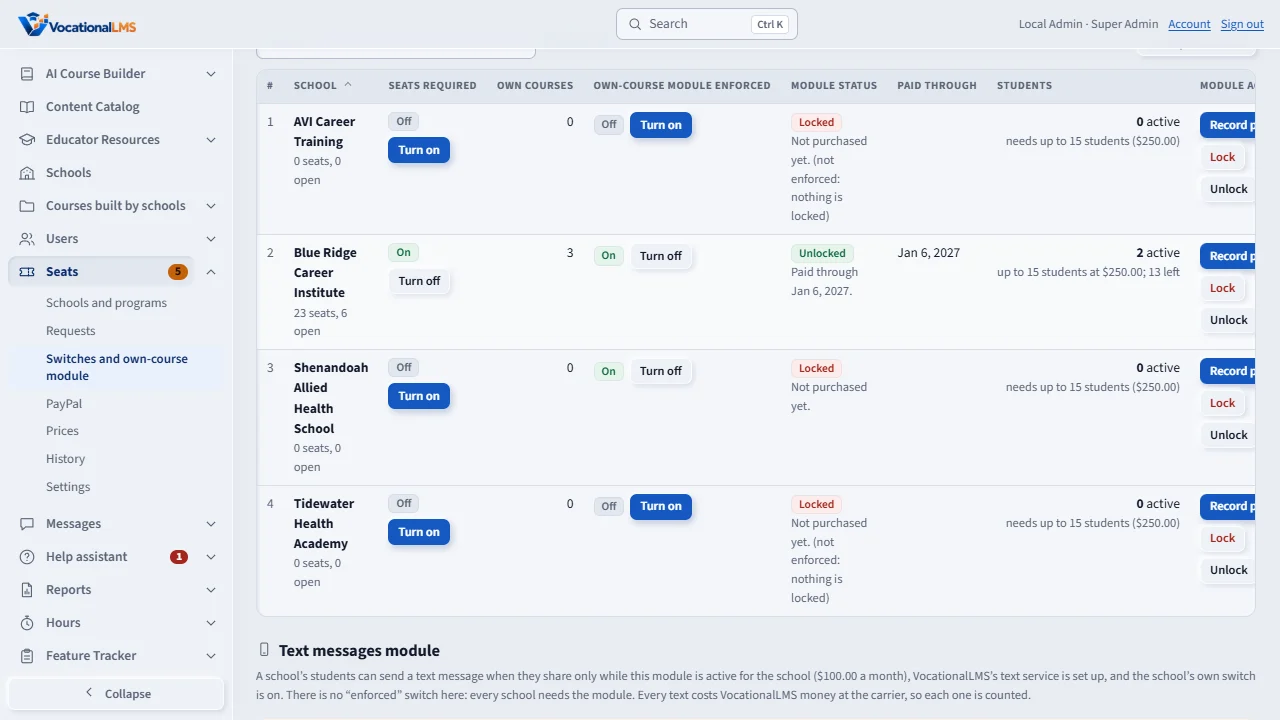
The own-course module is what lets a school create and edit its own courses. It applies to a school only after you turn Own-course module enforced on for it. Click Seats, then Switches and own-course module.
When a school pays by check or bank transfer, click Record payment. Type the months, the price, how it was paid, and the reference. The module is then unlocked through the new date. The Paid through column shows that date.
Lock and Unlock set the module by hand, for example after a returned check. Follow the date goes back to the paid-through date. A school's own request for the module arrives under Requests; paid with PayPal, it is approved and the paid-through date moves by itself.
The school gets a reminder seven days before the date, and seven days of grace after it. While the module is locked, the school sees this page when it tries to create a course. Its enrolled students keep learning.
Open this in VocationalLMSSeats > Settings > Own-course module
What it is for
The own-course module ($250.00 a month by default) is what lets a school create and edit its own courses. It applies to a school only after you turn Own-course module enforced on for it.
Steps
- Click Seats, then Switches and own-course module. The notice at the top lists the schools that already have their own courses.
- Under Own-course module enforced click Turn on for the school.
- When the school pays by check or bank transfer, click Record payment: months x price, how it was paid and the reference. The module is unlocked through the new date.
- A school's own request for the module arrives under Requests. Paid with PayPal, it is already approved and the paid-through date has moved by itself (V-41); paid by check or bank transfer, approve it like a seat request (V-14).
- Lock and Unlock set the module by hand; Follow the date goes back to the paid-through date.
What happens next
The school gets reminders 7 days before the paid-through date and on the day it ends, then 7 days of grace. When locked, the school opens its own courses read-only and its enrolled students keep learning.
Common problems
| # | Problem | What to do |
|---|---|---|
| 1 | A school that built courses before is suddenly locked. | You turned enforcement on with no payment recorded. Record a payment or click Unlock. |
| 2 | The price should be different. | Change the monthly price under Settings, or type the price when you record the payment. |