
A-81For School Admins and Directors
Transcripts: official and unofficial PDFs
Make a student's transcript on your letterhead, official or unofficial, choosing which sections print (Modules, Tests, Quizzes taken), with a transcript number and a verification code; every transcript issued is kept on the student's record.
How-to video A-81 · 0:44
Read the words of this video
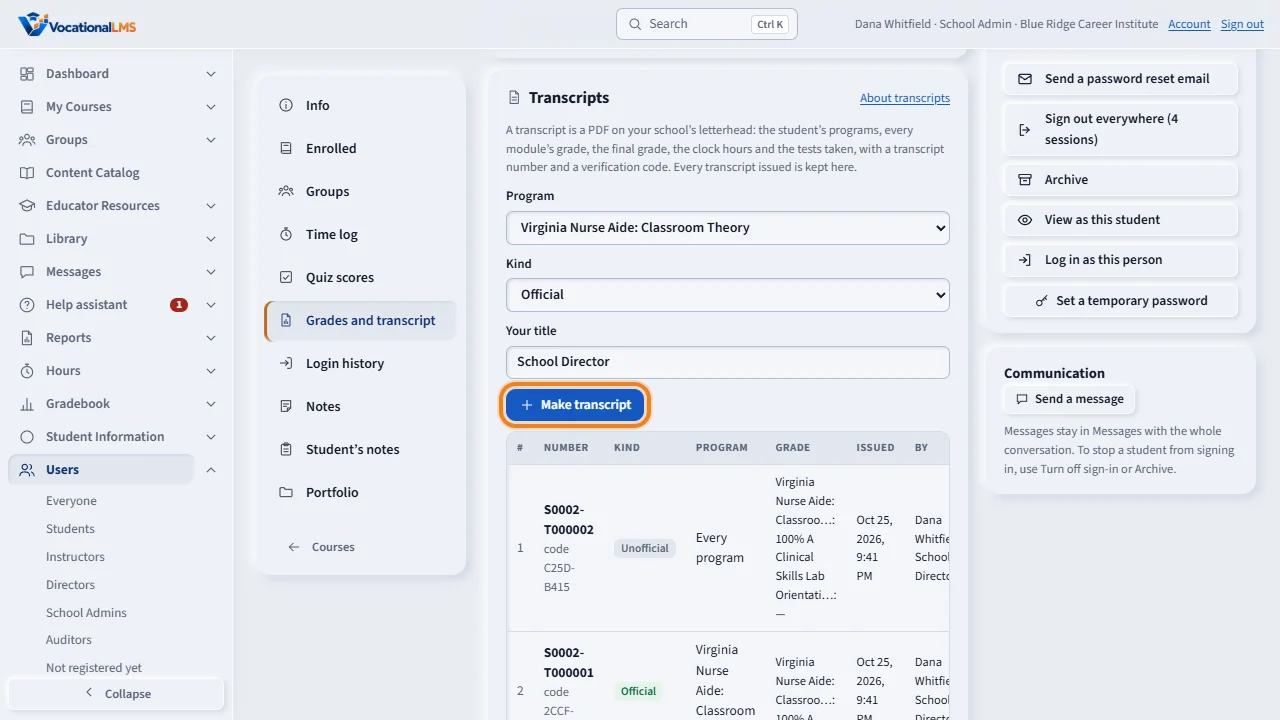
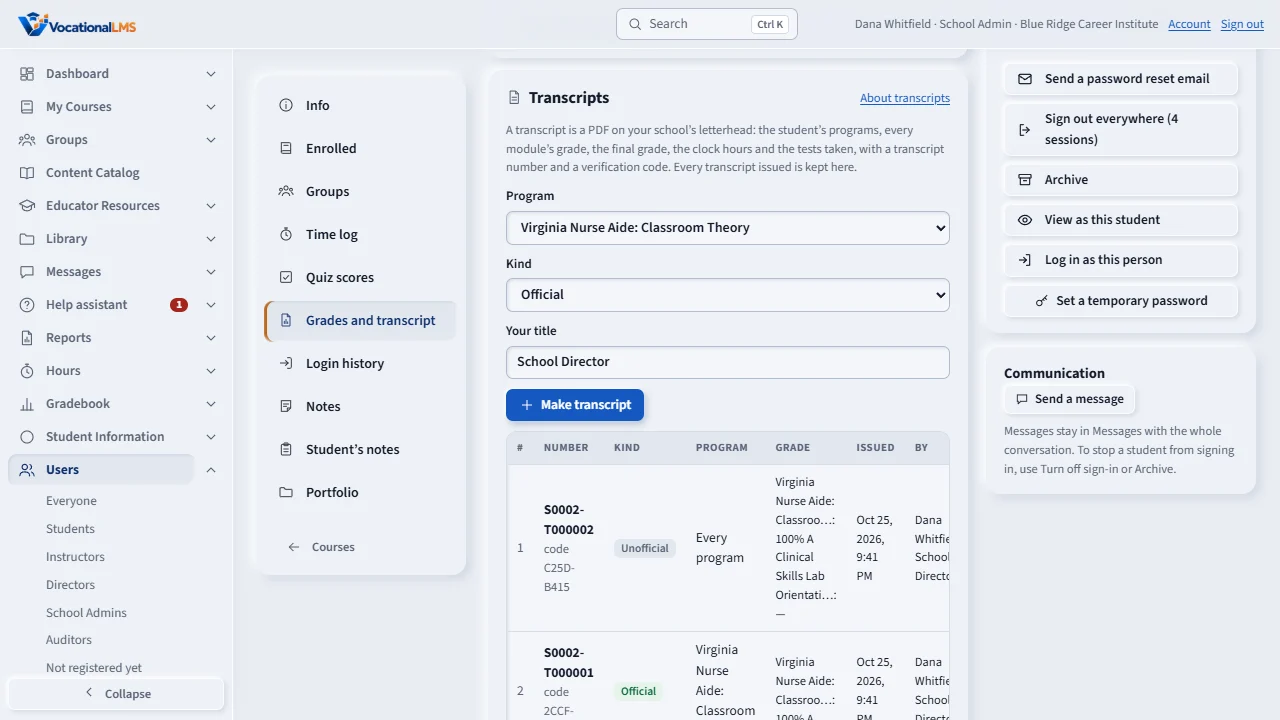
To make a transcript, open the student and click Grades and transcript. Choose the program or every program, official or unofficial, type your title, and click Make transcript. A window asks which sections to print: Modules, Tests and Quizzes taken. Untick one and it leaves the preview. Then click Make transcript again: the PDF opens on your school's letterhead, with a transcript number and a verification code.
Every transcript issued is kept on the student's record: its number, whether it was official, the grade on it, who issued it and when. Open PDF opens it again. Students cannot print transcripts; they ask the school office.
Open this in VocationalLMSUsers > a student > Grades and transcript
Who can do this: The Super Admin, the School Admin and a Director, for official and unofficial transcripts. An instructor can read the student's grades but cannot print a transcript. A student cannot print, download or make one: the student asks the school office.
What it is for
A transcript is a PDF on your school's letterhead with the student's name and Student ID, each program with its enrollment date and status, every module's grade and letter, the final course grade (or In progress with the current grade marked not final when the course is not finalized yet), the clock hours (online, on campus, live online, transfer and the total), every test taken with its score, the grading scale, the date issued, who issued it with their title, a sequential transcript number and a verification code. Official and unofficial transcripts (the unofficial ones carry an UNOFFICIAL watermark) are printed only by the Super Admin, the School Admin and a Director. Before the PDF is made you choose which sections print: Modules, Tests and Quizzes taken. The clock hours and the final grade always print. No GPA or credits are invented: the programs are clock-hour programs.
Steps
- Open the student (Users, or a name in the Gradebook) and click Grades and transcript in the left menu of their record.
- Under Transcripts, choose the Program (or Every program), the Kind (Official or Unofficial) and type Your title (for example School Director); it is printed under your name and remembered.
- Click Make transcript…. A window opens with three boxes, Modules, Tests and Quizzes taken, all ticked, and the transcript on screen. Untick what you do not want to print: it disappears from the preview too. Your last choice is remembered.
- Click Make transcript in that window. The PDF opens in a new tab; save or print it from there. If you left a section out, the page says Selected sections only at the bottom.
- The list below keeps every transcript issued for the student: its number, kind, program, the grade on it, who issued it and when, with Open PDF. A transcript printed with fewer sections says so there too.
- To verify a transcript somebody shows you, compare its number and code with this list.
What happens next
The grades on a transcript are the ones the Gradebook shows at that moment; after the course is finalized the transcript says FINAL and who finalized it, and the last line says whether every program on it was finalized. The fonts are embedded in the PDF so it prints and merges anywhere, and the file carries no computer or program name. The record keeps which sections were printed, and the public check page (vocationallms.com/transcripts/verify) shows Selected sections only: Modules, Tests for such a transcript, so nobody can pass a partial transcript off as a full one.
Common problems
| # | Problem | What to do |
|---|---|---|
| 1 | “Type your title for an official transcript.” | An official transcript names who issued it with their title. Type it once; it is remembered for next time. |
| 2 | “Only the Super Admin, a School Admin or a Director prints transcripts.” | Instructors and students cannot print transcripts; ask the school office. |
| 3 | Make transcript in the window is gray. | Every box is unticked. Tick at least one section. |
| 4 | The transcript says In progress. | The course is not finalized. Finalize it on the Gradebook's Final grades view, then make the transcript again. |
| 5 | The hours are 0.00. | The student has no credited online time and no hours entered under Hours yet. The transcript never guesses hours. |