
A-79For School Admins and Directors
Grading: your scale, passing mark and weights
Set how your school turns scores into grades: the letter scale (A 90, B 80, C 70...), the passing mark, how much tests, quizzes, posts and readings count, which take counts, and rounding.
How-to video A-79 · 1:06
Read the words of this video
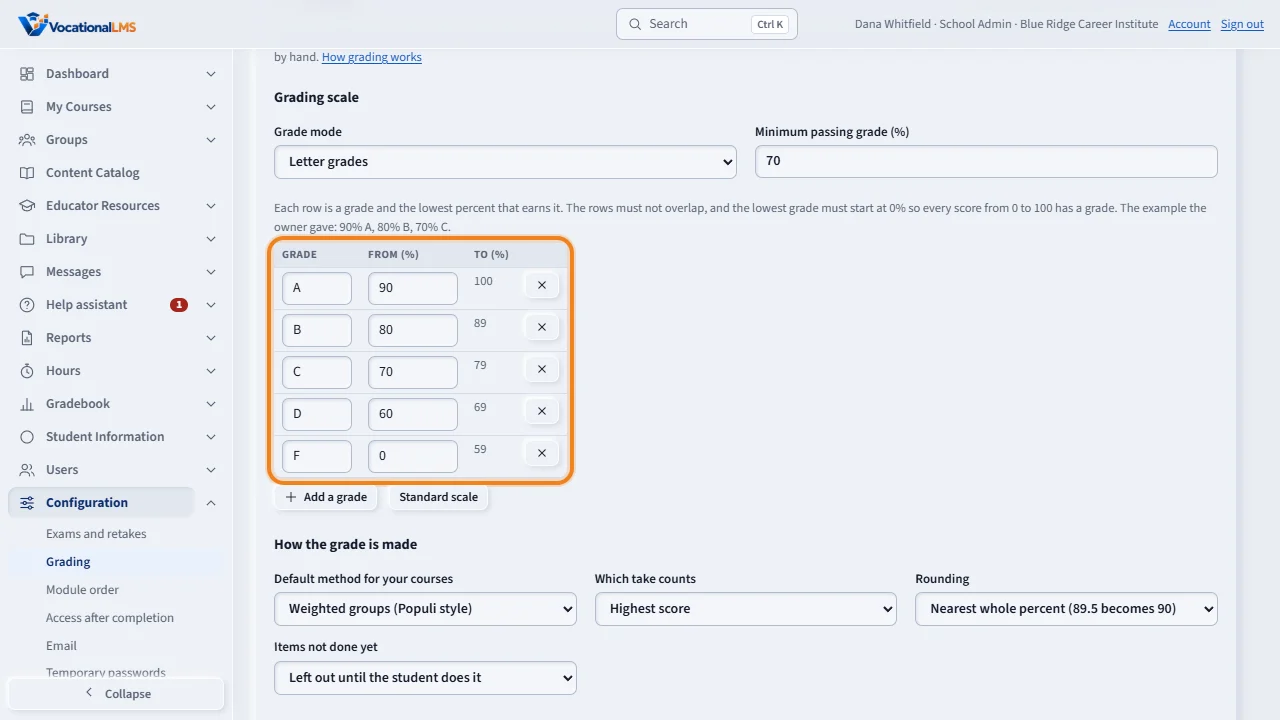
Every school grades its own way. Open Configuration, then Grading. The grading scale is a table of grades and the lowest percent that earns each one: ninety for an A, eighty for a B, seventy for a C. Add a row for B plus or A minus if you use them, and set the minimum passing grade.
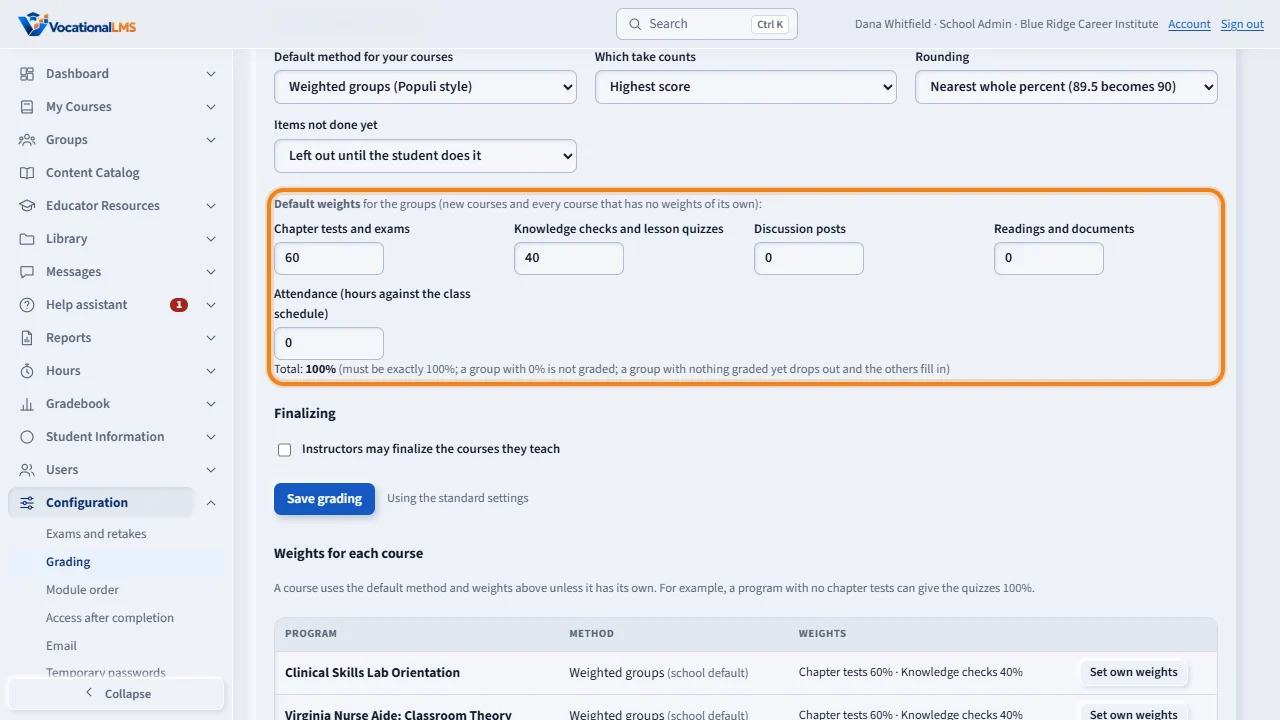
Then choose how the grade is made. With weighted groups, chapter tests, quizzes, posts and readings each get a share, and the shares must add up to one hundred. A group with nothing graded yet drops out, and the others fill in. You also choose which take counts when a student took a quiz twice, how percents are rounded, and whether work not done yet is left out or counted as zero. Click Save grading.
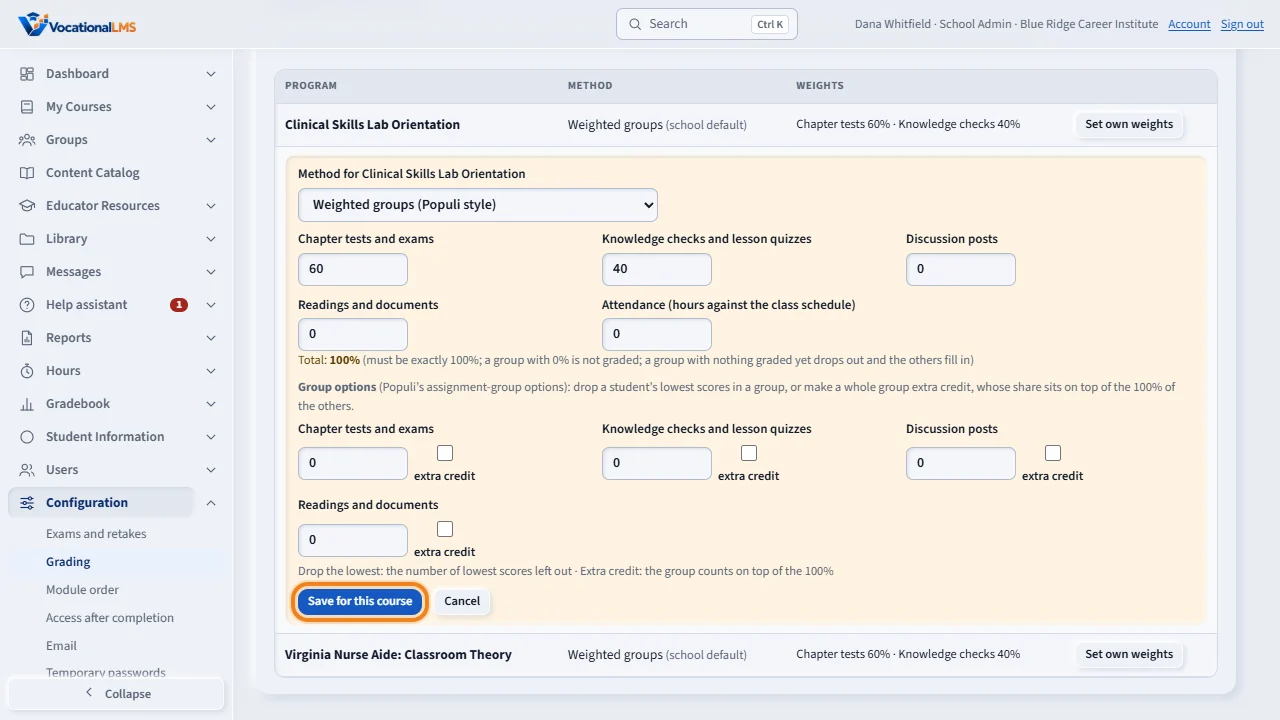
One program can have its own weights. Click Set own weights beside it, type its shares, drop a student's lowest quiz scores if you like, or make a group extra credit, and click Save for this course.
Open this in VocationalLMSConfiguration > Grading
Who can do this: The School Admin (or the VocationalLMS Super Admin viewing your school). A Director can read the page.
What it is for
Every school grades its own way. On Configuration > Grading you set the grading scale (which percent earns which letter, or pass/fail only), the minimum passing grade, and how the grade is made: weighted groups (chapter tests, quizzes, discussion posts, readings and, if you use a class schedule, attendance, each with a share of the grade, the way Populi does it) or points (every question counts the same). You also choose which take counts when a student took a quiz more than once, how percents are rounded, and whether an item the student has not done yet is left out or counted as 0. A course can have its own method and weights, drop the lowest scores in a group, or make a group extra credit. The Gradebook, every student's Transcript page and every transcript use these settings.
Steps
Set the scale
- Open Configuration, then the Grading tab.
- Under Grade mode keep Letter grades, or choose Pass / fail only (P or F against the passing mark).
- Type the Minimum passing grade: the percent a student needs to pass a module or a course (70 means a C or better).
- Edit the rows of the Grading scale: a grade and the lowest percent that earns it. The standard scale is A 90, B 80, C 70, D 60, F 0. Click Add a grade for rows like B+ or A-. The rows may not overlap and the lowest grade must start at 0, so every score has a grade.
- Click Save grading. Every grade and transcript follows the new scale right away.
Choose how the grade is made
- Under Default method for your courses, choose Weighted groups or Points.
- For weighted groups, type the Default weights: the share of each kind of work (for example tests 60%, quizzes 40%). They must add up to 100. A group with 0% is never graded. A group with nothing graded yet drops out and the others fill in.
- Choose Which take counts (highest, latest or the average of all takes), Rounding (89.5 becomes 90 and earns an A under the standard scale) and what to do with Items not done yet.
- Tick Instructors may finalize the courses they teach only if you want instructors to lock final grades; the School Admin and Directors always may.
- Click Save grading.
Give one course its own weights
- Under Weights for each course, click Set own weights beside the program.
- Choose its method and type its weights. Under Group options, type how many of a student's lowest scores to drop in a group (for example the 2 lowest quizzes), or tick extra credit on a group so its share sits on top of the 100% of the others.
- Click Save for this course. Use default takes the course back to the school's settings.
What happens next
Nothing is graded by hand here: the Gradebook recomputes every module grade and final grade from the scores students already have. How many takes a student may make stays on Exams and retakes; this page only decides which take's score counts. Items a school never grades (video-only lessons, flashcards) are never in a grade.
Common problems
| # | Problem | What to do |
|---|---|---|
| 1 | “The shares add up to 90%.” | The weights of the groups must total exactly 100. A group you do not grade gets 0. |
| 2 | “A and B both start at 90%.” | Two grades cannot cover the same percent. Give each row its own minimum. |
| 3 | “The lowest grade must start at 0%.” | The last row (usually F) must start at 0 so a score of, say, 12% has a grade. |
| 4 | A student's grade looks too high while the course runs. | With Items not done yet: left out, a grade is the average of what is graded so far. Choose Counted as 0 if you want missing work to pull the grade down from the start. |