
A-10For School Admins and Directors
Choose the instructors for a class
Tick who teaches a course, mark the main instructor, and give one student their own instructor.
How-to video A-10 · 0:54
Read the words of this video
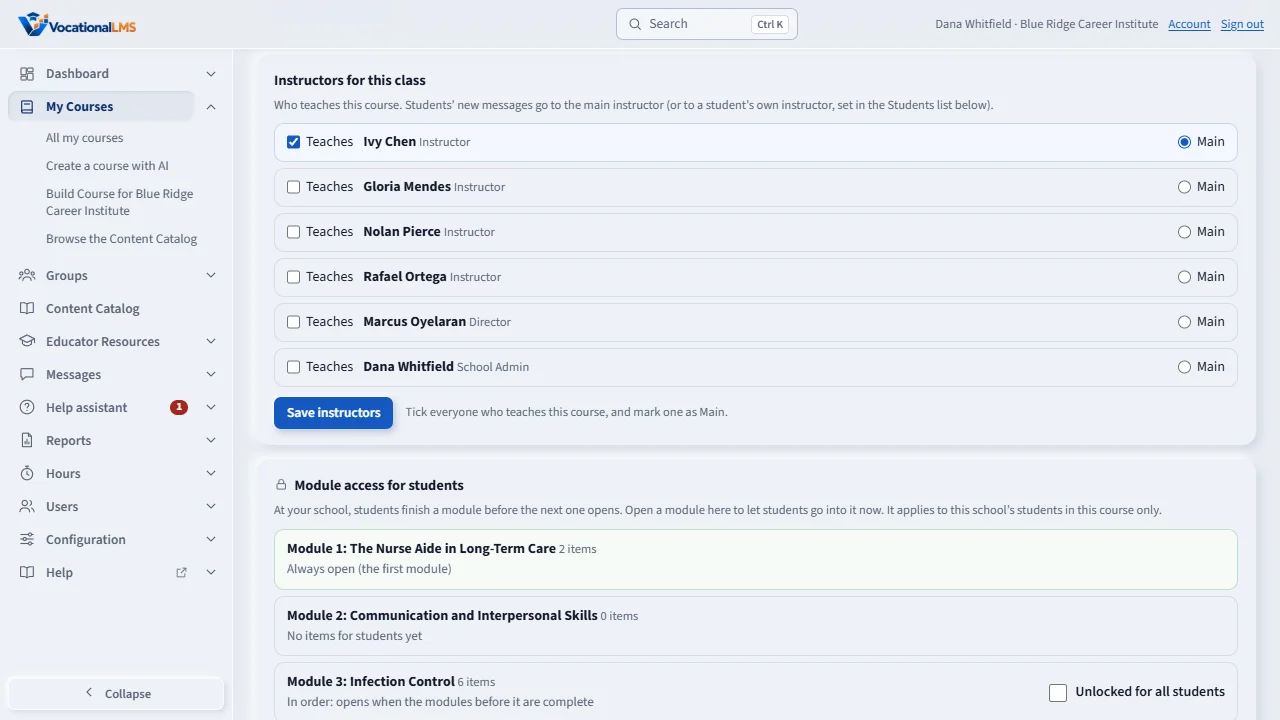
A class is one course at your school. Open the course. Under Instructors for this class, tick Teaches for everyone who teaches it, and mark one of them as Main.
Click Save instructors. The main instructor gets the students' new messages, and the questions the Help assistant cannot answer. An instructor you tick here now sees this program's students.
To give one student their own instructor, use the Instructor column in the Students list, for example for a make-up group. It saves as soon as you choose. Class instructor follows the main instructor.
A student's profile also has an Instructors table, with their instructor in each course. If a class has no instructor yet, the students' messages go to the School Admin. A Director can choose instructors too.
Open this in VocationalLMSMy Courses > a course > Instructors for this class
What it is for
A class is one course at your school. Its main instructor gets the students' new messages and the questions the Help assistant cannot answer.
Steps
- Click My Courses and open the course.
- Under Instructors for this class, tick Teaches for everyone who teaches it.
- Mark one of them as Main.
- Click Save instructors.
- To give one student their own instructor, use the Instructor column in the Students list. It saves as soon as you choose. Class instructor follows the main instructor.
What happens next
Ticking an instructor here is the same as ticking the program for them on Users: they now see this program's students. If a class has no instructor, students' messages go to the School Admin, then the Director.
Common problems
| # | Problem | What to do |
|---|---|---|
| 1 | Someone is missing from the list. | Add them on Users first, with the role Instructor (A-02). |
| 2 | A student's messages go to the wrong person. | Check the Instructor column for that student, then the Main mark. |