
A-03For School Admins and Directors
Choose the programs an instructor teaches
An instructor sees only the students of the programs you tick for them.
How-to video A-03 · 0:53
Read the words of this video
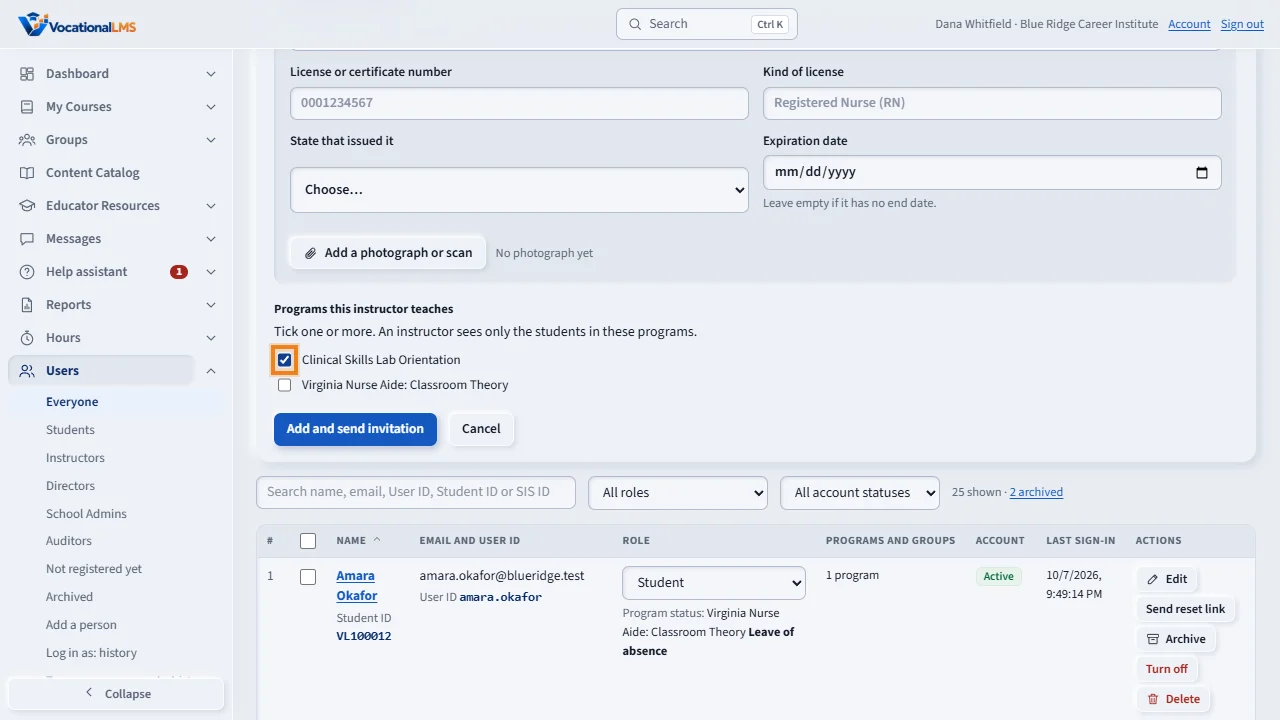
Each instructor has a list of programs they teach. When you add a person with the role Instructor, tick one or more programs under Programs this instructor teaches.
For an instructor who is already there, click Edit on their row, tick or untick programs, and click Save changes. The change works at once.
An instructor sees only the students of their programs. This instructor does not teach this program, so the Students list is empty for him. The same rule applies to student profiles, time logs, Messages and Help assistant chats.
The Users list shows each instructor's programs, or No program yet. An instructor with no program sees no students. A student who was given their own instructor is seen by that instructor.
Open this in VocationalLMSUsers > Instructors
What it is for
Each instructor has a list of programs they teach. It decides which students they can see: on course lists, student profiles, time logs, Messages and Help assistant chats.
Steps
- Click Users.
- To add an instructor: Add a person, choose the role Instructor, and tick the programs under Programs this instructor teaches.
- For an instructor who is already there: click Edit on their row and tick or untick programs.
- Click Add and send invitation or Save changes.
What happens next
The change works at once. The list shows each instructor's programs, or No program yet. An instructor with no program sees no students.
Common problems
| # | Problem | What to do |
|---|---|---|
| 1 | An instructor says the Students list is empty. | They have no program, or not this one. Tick it here. |
| 2 | One student needs a different instructor. | Give that student their own instructor on the course page (A-10). That instructor then sees the student. |