
V-12For the VocationalLMS Super Admin
Import lesson videos produced outside the builder
A command-line tool attaches finished videos, captions, readings and quizzes to their lessons.
How-to video V-12 · 0:53
Read the words of this video
Lessons produced outside the AI Course Builder, such as videos made by the content team, are attached to their lessons with an import tool. There is no button for this in the Studio: a developer runs the tool.
Each lesson package carries the finished video, the captions, the reading and the quiz, in every language. The tool uploads each one and attaches it to the lesson with the matching number.
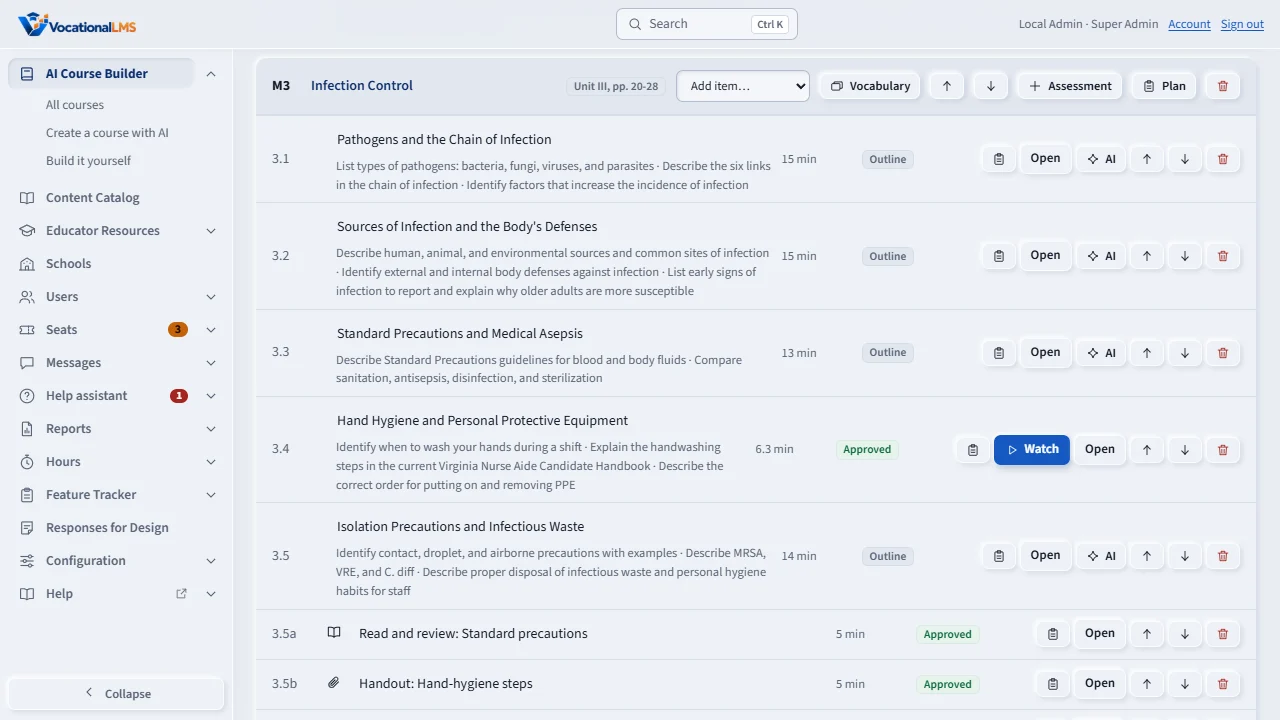
After an import, open the course. The lessons show Video ready. Open each one and check the video, the reading and the quiz, in each language.
Then send each lesson for review and approval, as usual. An imported lesson behaves like any other: protected playback, the ninety-five percent rule, seat time, and the quiz.
Open this in VocationalLMSAI Course Builder > a course
Who can do this: The Super Admin, with help from the developer who runs the tool. There is no button for this in the Studio.
What it is for
Lessons produced outside the AI Course Builder (for example the CNA videos made by the content team) are attached to their lessons with a tool, tools/import_cna.py. Each lesson package carries the video, captions, reading and quiz in every language.
Steps
- The content team delivers one folder per lesson in the agreed format (
vocationallms-lesson-importversion 1 or 2). - The developer runs
tools/import_cna.py. It uploads each lesson and attaches it to the matching lesson number of the course. - Open the course in the Studio. Imported lessons show Video ready.
- Open each lesson, check the video, reading and quiz, and send it for review and approval as usual.
What happens next
An imported lesson behaves like any other: protected playback, the 95% rule, seat time, quiz, review and version history. Its reading is not edited in the Studio; a new import replaces it.
Common problems
| # | Problem | What to do |
|---|---|---|
| 1 | A lesson did not attach. | Its number does not match a lesson of the course. Fix the number in the package and import again. |
| 2 | The imported reading has a mistake. | Correct it in the source and import that lesson again. |