
S-16For students
Your profile, Student ID and password
See your Student ID, your User ID and your school, set your lesson language, and change your password.
How-to video S-16 · 1:08
Read the words of this video
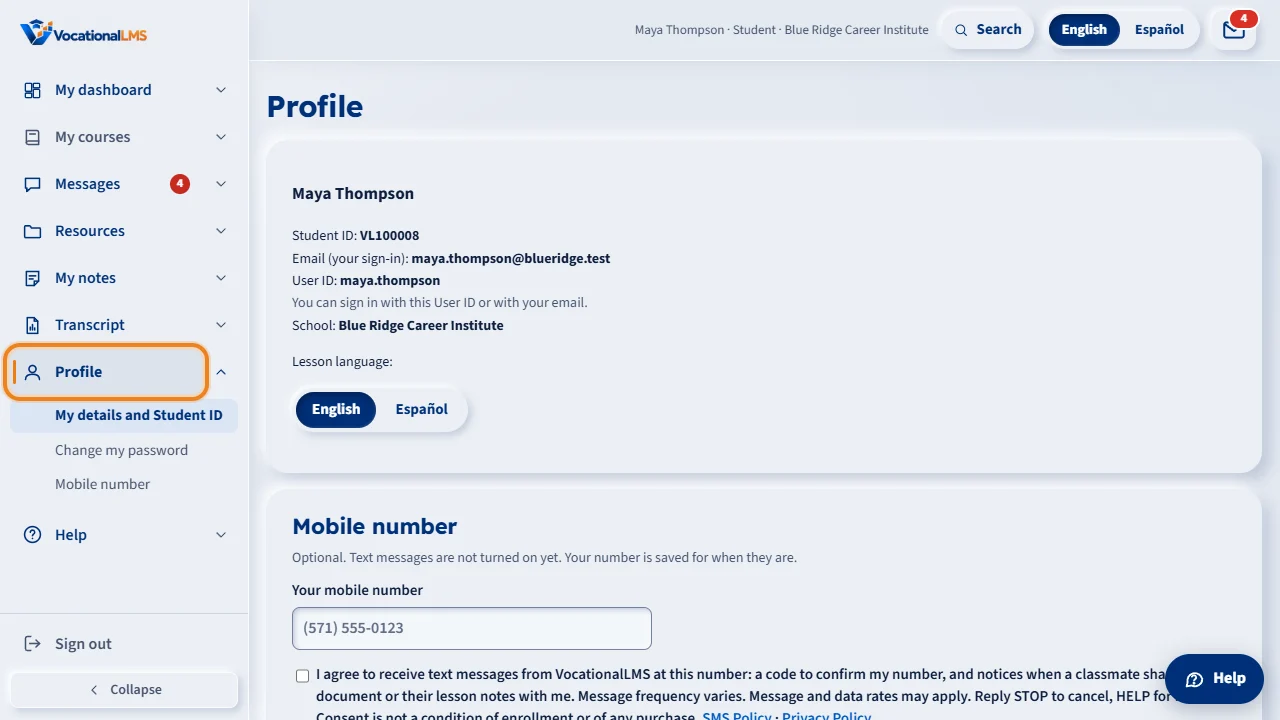
Click Profile in the menu on the left. It shows your name, your Student ID, your User ID, the email you sign in with, and your school. You can sign in with your User ID or with your email. Your Student ID is the number your school uses for you on rosters and records.
Under Lesson language, choose English or Español. The choice is saved to your account, so your lessons open in that language on any computer or phone.
To change your password, type your current password and a new one, then click Change password. A new password needs at least ten characters, with upper-case and lower-case letters and a number.
Under Mobile number you can add or change your own mobile number. If your name, your email or your User ID is wrong, ask your school to change it. Students cannot change those themselves. And if you do not remember your current password, sign out and use Forgot password on the sign-in page.
Open this in VocationalLMSProfile
What it is for
Profile shows the details your school has for you, including your Student ID, and lets you change your password and your lesson language.
Steps
- Click Profile in the menu on the left.
- Find your Student ID (for example VL100008), your User ID, the email you sign in with, and your school. You can sign in with your User ID or with your email.
- Under Lesson language, choose English or Español.
- Under Mobile number, you can add or change your mobile number (S-18).
- To change your password, type your Current password and a New password, then click Change password.
What happens next
The page says Password changed. Use the new password the next time you sign in. A new password needs at least 10 characters, with upper-case and lower-case letters and a number.
Common problems
| # | Problem | What to do |
|---|---|---|
| 1 | Your name, email or User ID is wrong. | Only your school can change them. Message your instructor or administrator (S-11). |
| 2 | You do not remember your current password. | Sign out and use Forgot password? on the sign-in page (S-01). |