
I-12For instructors
Read a student's notes and bookmarks
See what a student typed in their lessons and the video moments they saved. Read only.
How-to video I-12 · 0:23
Read the words of this video
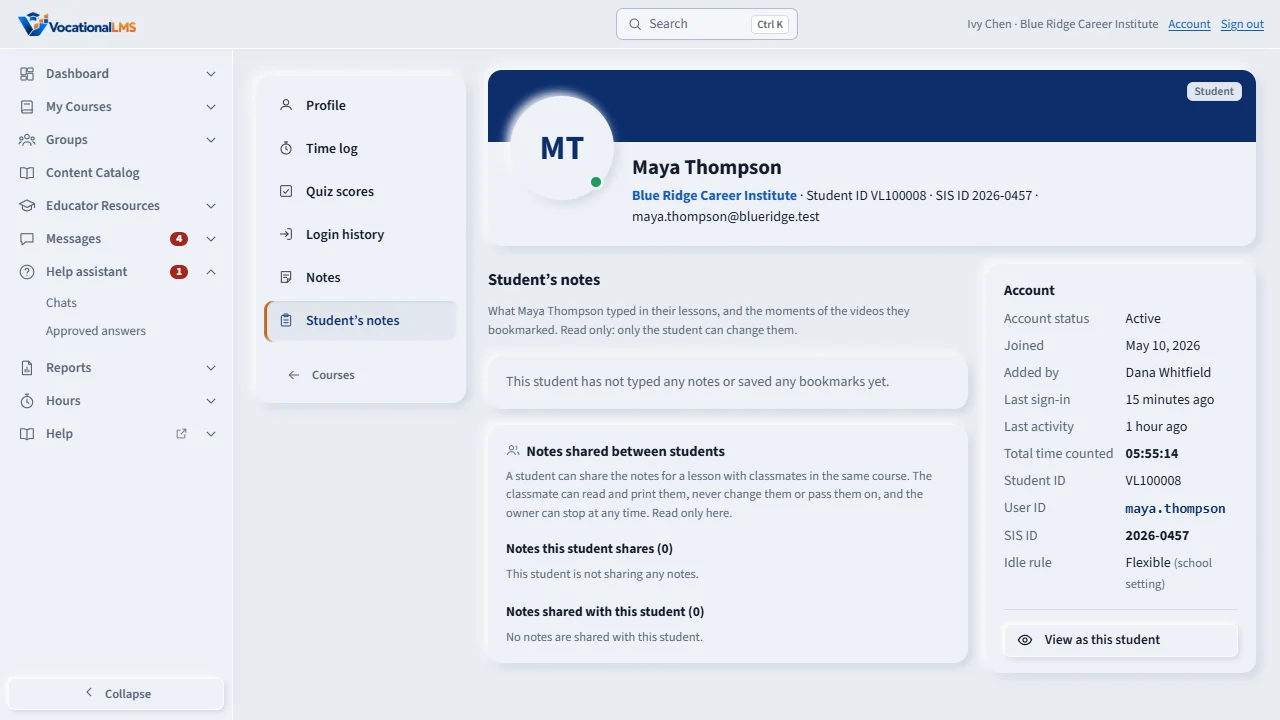
Students can type notes in every lesson and bookmark moments of a video. To read them, open the student's profile and click Student's notes. You see what the student wrote for each lesson, and the video moments they saved, by course and module. It is read only, and an instructor sees it only for their own students.
Open this in VocationalLMSUsers > a student > Notes and bookmarks
What it is for
Students can type notes for every item and bookmark moments of a video (S-20). Staff who work with the student can read them on the student's profile. This shows you what a student understood and what they asked themselves.
Steps
- Open the student's profile (click the student's name in a course's Students list, or in Users).
- Click Student's notes in the left menu.
- Read the notes for each lesson and the bookmarks, listed by course and module.
What happens next
It is read only: nobody but the student can change their notes. An instructor sees this only for students in their own programs. A School Admin and a Director see it for every student of the school.
Common problems
| # | Problem | What to do |
|---|---|---|
| 1 | The list is empty. | The student has not typed any notes or saved any bookmarks yet. |
| 2 | You cannot open a student. | An instructor can open only the students of the programs they teach (I-02). |