
I-07For instructors
Discussions: read your students' posts, reply, and hide a post
See what your school's students wrote, answer them, and hide a post that does not belong.
How-to video I-07 · 0:44
Read the words of this video
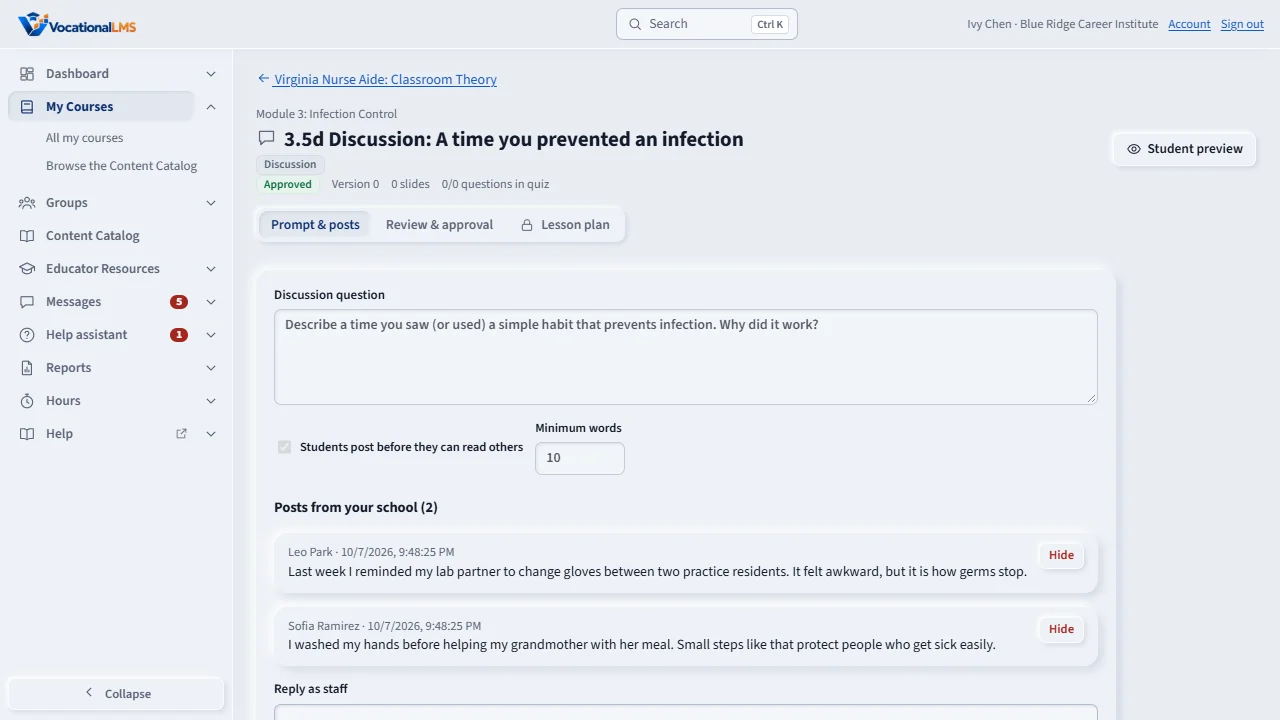
A discussion item asks students one question. Open it from the course page. The Prompt and posts tab shows the question and its settings: students must post first, and the minimum number of words.
Posts from your school lists what your students wrote, with their names and the time. You never see posts from other schools that use the same course.
To answer the class, type in the reply box and click Post reply. Students who have posted see your reply under Class posts.
If a post does not belong, click Hide. The post is kept for your records, but students no longer see it.
Open this in VocationalLMSCourses > a discussion item
What it is for
A discussion item asks students one question. Students must post their own answer before they can read their classmates' posts. In the Studio you see every post from your school and can reply to the class.
Steps
- Open the course and click Open on the discussion item. On a course VocationalLMS gave your school, click Preview to read it as a student, or open it from the lesson list.
- On the Prompt & posts tab you see the question, its settings and Posts from your school.
- To answer the class, type in the reply box and click Post reply.
- To take a post out of view, click Hide on it. The post is kept, but students no longer see it.
What happens next
Students who have posted see your reply under Class posts. Posts from other schools that use the same course are never shown to you or your students.
Common problems
| # | Problem | What to do |
|---|---|---|
| 1 | A student says they cannot read the posts. | They have not posted yet, or their post was shorter than the minimum words. |
| 2 | You want to change the question. | On a VocationalLMS course only VocationalLMS changes it. On your school's own course a School Admin or Director can. |