
A-18For School Admins and Directors
Send an announcement to the whole school or to chosen groups
Students, Instructors, School admins and directors, in any mix, for the school or one course.
How-to video A-18 · 0:51
Read the words of this video
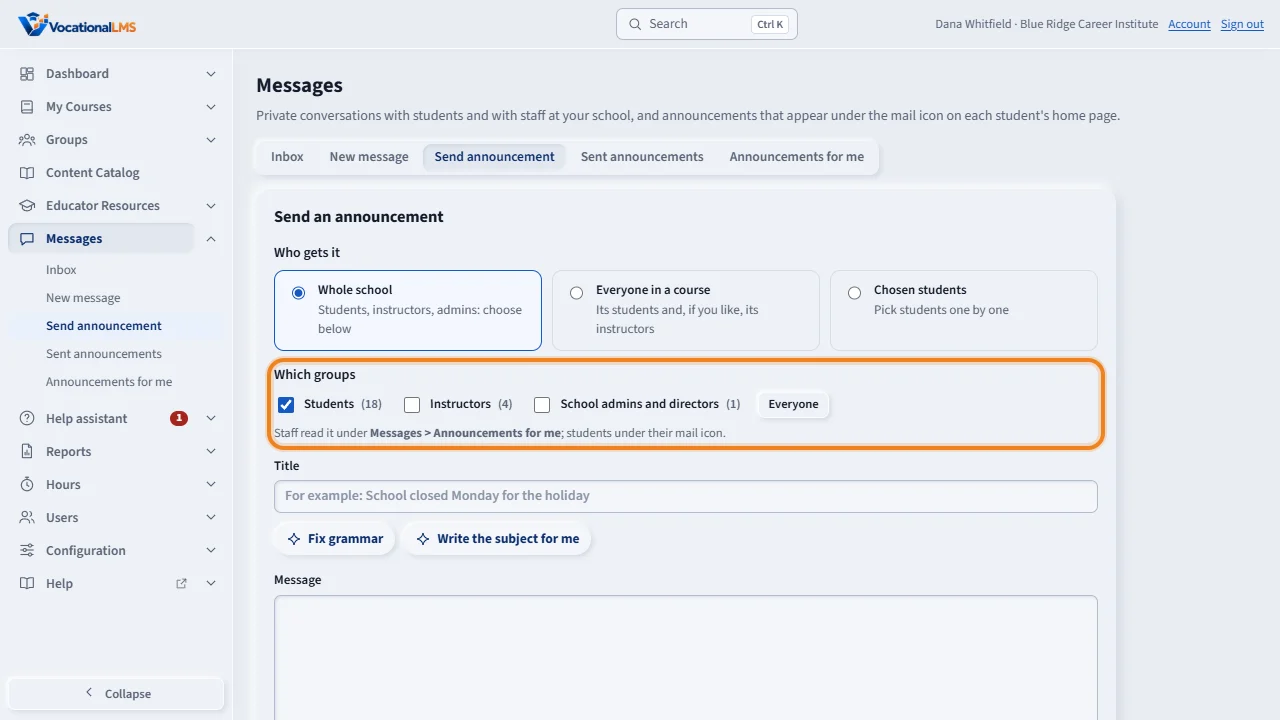
A School Admin or Director can send one announcement to any mix of three groups: Students, Instructors, and School admins and directors. Click Messages, then Send announcement.
Under Who gets it, choose Whole school, Everyone in a course, or Chosen students. Then tick the groups. Everyone ticks all three, which is the entire school.
Type the title and the message. Tick Priority for something people must see, and the email notice if you want one. Then click Send announcement.
Sent announcements shows how many people have read each one. Who read it lists each person with their role. Staff read announcements under Announcements for me, and students under their mail icon. Instructors can send to students only.
Open this in VocationalLMSMessages > Send announcement
What it is for
A School Admin or Director can send one announcement to any mix of three groups: Students, Instructors, and School admins and directors. Everyone ticks all three: the entire school.
Steps
- Click Messages, then Send announcement.
- Under Who gets it choose Whole school, Everyone in a course or Chosen students.
- Tick the groups, or click Everyone. For a course: its students and, if ticked, the instructors who teach it.
- Type the title and message. Tick Priority for a must-read, and the email notice if you want one.
- Click Send announcement.
What happens next
Students read it under their mail icon. Staff read it under Messages > Announcements for me; the number of unread ones shows on the tab. Sent announcements shows how many people read it, and Who read it lists each person with their role.
Common problems
| # | Problem | What to do |
|---|---|---|
| 1 | An instructor cannot tick staff groups. | Instructors send to students only. |
| 2 | People who joined later did not get it. | Announcements go to the people in the group at the moment you send. |