
A-08For School Admins and Directors
The Content Catalog and your school's library
See the VocationalLMS courses, which ones your school has, and how to get another.
How-to video A-08 · 1:03
Read the words of this video
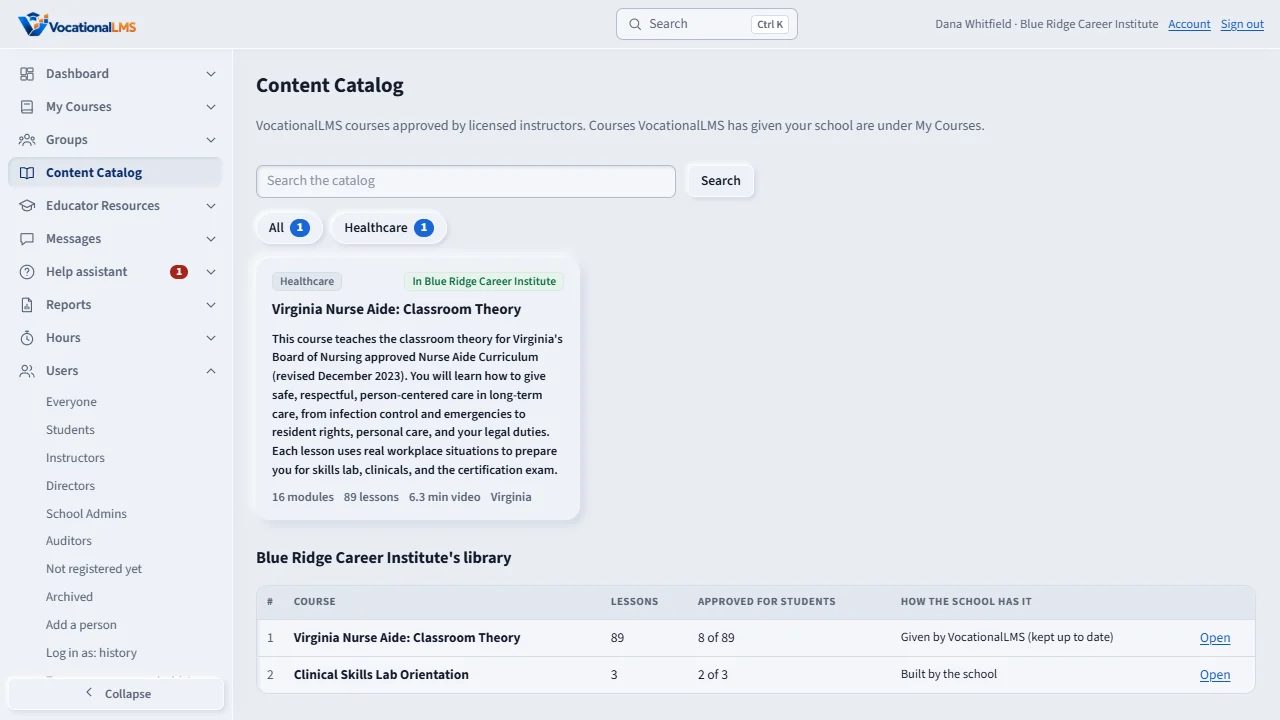
The Content Catalog lists the VocationalLMS master courses, approved by licensed instructors. You can search by title or pick a category. A course marked with your school's name has been given to you.
Your school's library, at the bottom, lists every course you have: its lessons, how many are approved for students, and how you have it, either given by VocationalLMS or built by the school. Click Open to go to the course.
The courses VocationalLMS gave your school are also under My Courses and on your dashboard. VocationalLMS keeps them up to date. Students see only lessons that a licensed instructor has approved.
To get a course you do not have, contact VocationalLMS. The Super Admin gives it to your school, and it appears under My Courses at once. You cannot change its lessons, but you can add your own items to it.
Open this in VocationalLMSContent Catalog
What it is for
The Content Catalog lists the VocationalLMS master courses. A course marked In your school has been given to you; it is under My Courses. VocationalLMS keeps it up to date, and your school uses it as published.
Steps
- Click Content Catalog in the menu on the left.
- Search by title, or click a category such as Healthcare.
- Read a course card: its description, modules, lessons and minutes of video.
- Look at your school's library at the bottom: every course you have, how many lessons are approved for students, and how you have it (given by VocationalLMS, or built by the school). Click Open to go to it.
- To get a course you do not have, contact VocationalLMS. The Super Admin gives it to your school and it appears under My Courses at once.
What happens next
A course does not need to be finished to be given. Students see only the lessons a licensed instructor has approved, so lessons appear for them as they are approved.
Common problems
| # | Problem | What to do |
|---|---|---|
| 1 | There is no button to add a course yourself. | Courses are given by VocationalLMS. Call or message VocationalLMS support. |
| 2 | You want to change a lesson in a VocationalLMS course. | You cannot; but you can add your school's own items to it (A-11), or build your own course (A-12). |