
A-05For School Admins and Directors
Edit a person, send a reset link, or turn sign-in off
Fix a name or email, change a role, help someone who forgot their password, or block sign-in.
How-to video A-05 · 1:01
Read the words of this video
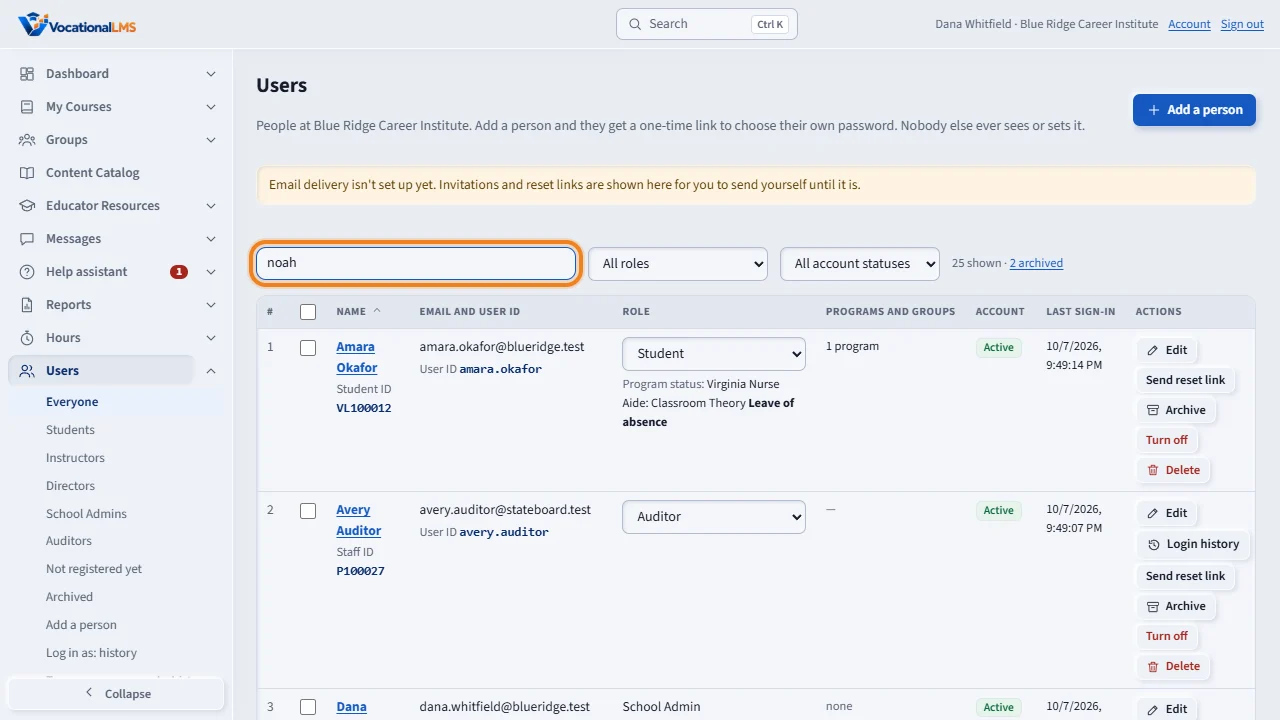
Every row on the Users page has the tools to keep a person's account right. Find the person with the search box, or with the role and status filters.
Edit changes the name, the sign-in email, the User ID and the role. Click Save changes. After an email change, the person signs in with the new address or with their User ID. The User ID stays the same and still works, and so does the password.
Send reset link makes a one-time link, good for one hour, so the person can choose a new password. You never see or set anyone's password.
Turn off blocks sign-in right away and signs the person out everywhere. Nothing is deleted, and Turn on brings them back. Delete removes a staff member who has no records. A staff member with messages or notes is turned off instead.
Open this in VocationalLMSUsers > a person > Send reset link
What it is for
Every row on Users has the tools to keep a person's account right. Nothing here shows or sets a password: people always choose their own.
Steps
- Click Users and find the person with the search box or the role and status filters.
- Edit changes the name, the sign-in email, the User ID and the role. Click Save changes.
- Send reset link makes a one-time link (1 hour) so the person can choose a new password.
- Turn off blocks sign-in right away and signs the person out everywhere. Nothing is deleted. Turn on brings them back.
- Delete removes a staff member who has no records. For a student, see A-07.
What happens next
After an email change the person signs in with the new address or with their User ID. The User ID stays the same and still works, and the password stays the same. A staff member who has messages, notes or course work cannot be deleted; turn them off instead.
Common problems
| # | Problem | What to do |
|---|---|---|
| 1 | “An email someone else uses.” | Two accounts cannot share an email. |
| 2 | You cannot delete your own account. | Another School Admin or VocationalLMS must do it. |
| 3 | The person says the reset link expired. | It works for one hour. Send a new one. |